SOHO Network To Go

Years ago at a former employer, I designed a product called the “Rapid Deployment Network” (RDN). It was basically a robust back office system pre-configured and packed into a small-ish cabinet so that it could be shipped overseas and plugged in. Bam. The RDN business never took off because it didn’t fit will with the procurement model of the intended consumer but I find myself revisiting the problem for my relocation to Ghana.

mini-server

I want to take a fully functional SOHO office network with me that I can plug into an Internet connection and go. However, I am very cognizant of my weigh allowances for air freight so I want to pack as much as I can into as little weight as I can. And I’d like to keep the overall wattage down.

My server is based on a Mac Mini running Windows Server 2008 R2.

net-gear

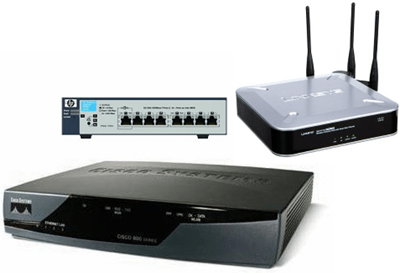
I’m also taking along some network hardware that runs cool without fans:

  • Cisco 851 router (firewall and VPN feature set) –> max 26 Watts
  • Cisco WAP4410 Wireless N access point –> max 10.1 Watts
  • HP Procurve 1810G 8-port managed gigabit switch –> max 15 Watts

That puts my maximum power consumption of the core network infrastructure at 201.1 watts but most of the time it will be idle at maybe 30 to 50 Watts.power

In addition I have an APC Smart-UPS 750 uninterruptible power supply. It is basically a 500 Watt, 750 Volt-Amp battery and inverter appliance that connects to the server via USB. This allows the server to safely shut itself down before the UPS runs out of power. Along with the UPS, I have a 500 Watt step-down transformer and voltage stabilizer to smooth out power going in.

I’m pretty satisfied with what I have cobbled together. The are two main issues which are essentially logistical.

  1. The UPS and the voltage stabilizer are fairly big and heavy. 31 pounds for the UPS which contains actual lead. The transformer/stabilizer has big copper coils inside it an weighs in at 14 pounds.
  2. Should the hard disk inside of the Mac Mini fail, it is a real bitch to replace it. You need a sand paper, a putty knife, spudger, tiny phillips screw driver and a steady hand.

Moving to Ghana

My wife accepted a position on a USAID-funded project in Ghana so we are moving to Accra. We just got back from the travel medicine office. It turns out that most of the vaccinations that I received from Peace Corps expired a few years ago. I got loaded up with 4 major vaccinations and also a TB skin test. Fun, fun, fun.

C# as Universal Smart Phone Programming Language?

We started thinking about building a smart phone app to interface to PeopleMatrix. The obvious devices to support are BlackBerry, iPhone, Android and Windows Mobile. There is also Symbian but those devices are unusual in our primary market. Each one of these platforms has a totally different programming model:

  • BlackBerry –> Java ME + RIM libraries
  • iPhone –> Objective-C
  • Android –> Subset of Java 5 + Apache commons and  Android libraries
  • Windows Mobile –> C/C++ and .NET CF
  • Symbian –> Weird non-standard Symbian C++ variant and Qt

I just can’t envision anyone using their smartphone to interact with a sophisticated app on a screen the size or a postage stamp. That eliminates Blackberry and (many) Windows Mobile devices. Also, you have to prioritize developing for the device platforms that are growing. That means iPhone and Andoid. iPhone is very popular and Android has shown amazing growth.

The problem is that the development environment is totally different so that porting applications between Android and iPhone is a complete re-write. One ray of hope for leveraging code across these platforms is the Mono project. Novell is currently shipping a product called MonoTouch which compiles C# code into native binaries for the iPhone. The Mono guys also have Mono working on Android with proxy classes that call into the Android libraries. (In early testing Mono appears to out-perform Dalvik, too.)

If Mono on Android gets polished up like MonoTouch, that would make C# a first class programming language for a huge swath of the most exciting devices. The largest challenge for managing the codebase of an app is that it is very likely that each platform would require care to abstract access to platform-native APIs which would certainly include the GUI and other hardware interfaces.

Even so, I am watching Mono closely. Interesting times.

Override PageStatePersister to Eliminate ViewState

I was working on some legacy ASP.Net code recently. We were profiling performance and the key problem was wire performance because of ViewState. Our first idea was to eliminate use of ViewState but there were a lot of implicit dependencies inside of some complex data binding on a GridView control and time was short.

We were able to yield huge performance gains by overriding the PageStatePersister property of a key code-behind class. The change moves the state that would be serialized as great gobs of base64-encoded drek into Session so that it is stored in memory on the server. This isn’t a perfect solution because it increases the memory demand on the server. For this scenario, it was a good medium-term compromise that hugely improves performance over a slow WAN.

The PageStatePersister class and property on System.Web.UI.Page is “new” to ASP.Net 2.0+. It is an abstract class that is exposed as a PageStatePersister property in the code-behind. Microsoft ships two concrete implementations: HiddenFieldPageStatePersister and SessionPageStatePersister. The default is HiddenFieldPageStatePersister which emits base64 text to a hidden __VIEWSTATE input element in the rendered HTML. The SessionStatePersister puts the data in Session instead. It is there to help optimize the generated HTML for mobile browsers and low-bandwidth scenarios.

Here’s the code to do the switcheroo that puts the ViewState data into Session.

/*
 * HACK: put the veiwstate into session instead of writing to page. Then the __ViewState will only contain the required
 * ControlState. This increases server memory consumption. A better long-term solution would be to rework the GridView
 * to work with ViewState disabled and put it inside of an UpdatePanel.
 */
protected override PageStatePersister PageStatePersister
{
    get
    {
        return new SessionPageStatePersister( Page );
    }
}

Interesting Post about Microsoft’s C# Compiler

One of the guys from the C# compiler team at Microsoft posted this article about how their C# compiler goes about parsing source code and emitting an assembly. Whereas C and C++ are a single pass, the C# compiler does dozens of passes. Somehow csc seems to do this much faster than cl or gcc would compile a comparable body of C/C++. I suspect the multiple passes also help the compiler to emit really good error messages.

Fascinating stuff.

PowerShell’s Object Pipeline Corrupts Piped Binary Data

Yesterday I used curl to download a huge database backup from a remote server. Curl is UNIX-ey. By default, it streams its output to sdout and you then redirect that stream to a pipe or file like this:

$ curl sftp://server.somehwere.com/somepath/file > file

The above is essentially what I did from inside of a PowerShell session. After a couple of hours, I had my huge download and discovered that the database backup was corrupt. Then I realized that the file I ended up with was a little over 2x the size of the original file.

What happened?

Long story, short. This is a consequence of the object pipeline in PowerShell and you should never pipe raw binary data in PowerShell because it will be corrupted.

The Gory Details

You don’t have to work with a giant file. A small binary file will also be corrupted. I took a deeper look at this using a small PNG image.

PS> curl sftp://ftp.noserver.priv/img.png > img1.png
  % Total    % Received % Xferd  Average Speed   Time    Time     Time  Current
                                 Dload  Upload   Total   Spent    Left  Speed
100 46769  100 46769    0     0  19986      0  0:00:02  0:00:02 --:--:— 74950

(FYI. Curl prints the progress of the download to stderr, so you see something on the console even though the stdout is redirected to file.)

This is essentially what I did with my big download and yields a file that is more than 2x the size of the original. My theory at this point was that since String objects in .Net are always Unicode, the bytes were being doubled as a consequence of an implicit conversion to UTF-16.

Using the > operator in PowerShell is the same thing piping to the Out-File cmdlet. Out-File has some encoding options. The interesting one is OEM:

"OEM" uses the current original equipment manufacturer code page identifier for the operating system.

That is essentially writing raw bytes.

PS> curl sftp://ftp.noserver.priv/img.png | out-file -encoding oem img2.png
  % Total    % Received % Xferd  Average Speed   Time    Time     Time  Current
                                 Dload  Upload   Total   Spent    Left  Speed
100 46769  100 46769    0     0  26304      0  0:00:01  0:00:01 --:--:-- 74950

I was clearly on to something because this almost works. The file is just slightly larger than the original. It almost worked.

Just to prove that my build of curl isn’t broken, I also used the –o (–output) option.

PS> curl sftp://ftp.noserver.priv/img.png -o img3.png
  % Total    % Received % Xferd  Average Speed   Time    Time     Time  Current
                                 Dload  Upload   Total   Spent    Left  Speed
100 46769  100 46769    0     0  25839      0  0:00:01  0:00:01 --:--:-- 76796

Here’s the result. You can see by the file sizes and md5 hashes that img1.png and img2.png are corrupt but img3.png is the same as the original img.png.

PS> ls img*.png | select name, length | ft -AutoSize

Name     Length
----     ------
img.png   46769
img1.png  94168
img2.png  47083
img3.png  46769


PS> md5 img*.png
MD5 (img.png) = 21d5d61e15a0e86c61f5ab1910d1c0bf
MD5 (img1.png) = eb5a1421bcc4e3bea1063610b26e60f9
MD5 (img2.png) = 03b9b691f86404e9538a9c9c668c50ed
MD5 (img3.png) = 21d5d61e15a0e86c61f5ab1910d1c0bf

Hrm. What’s going on here?

Let’s look at a diff of img.png and img1.png, which was the result of using the > operator to redirect the stdout of curl to file.

diff-img-img1

The big thing to see here is that there are a lot of extra bytes. Crucially, the bytes are Unicode glyphs and FFFE have been added as the first two bytes. 0xFFEE is the byte order mark for a little-endian UTF-16. That confirms my theory that internally PowerShell converted the data to Unicode.

I can also create the same behavior by the Get-Content (aliased as cat) cmdlet to redirect binary data to a file.

PS> cat img1.png > img4.png
PS> ls img1.png, img4.png | select name, length | ft -AutoSize

Name     Length
----     ------
img1.png  94168
img4.png  94168

So what is going on inside that pipeline?

PS> (cat .\img.png).GetType() | select name

Name
----
Object[]


PS> cat .\img.png | %{ $_.GetType() } | group name | select count, name | ft -AutoSize

Count Name
----- ----
  315 String

The file is being converted into an Object array of 315 elements. Each element of the array contains a String object. Since the internal data type of String is Unicode, sometimes referred to loosely as “double-byte” characters, the total size of that data is roughly doubled.

Using the OEM text encoder converts the data back but not quite. What is going wrong? Time to look at a diff of img.png and img2.png, which was the OEM text encoder.
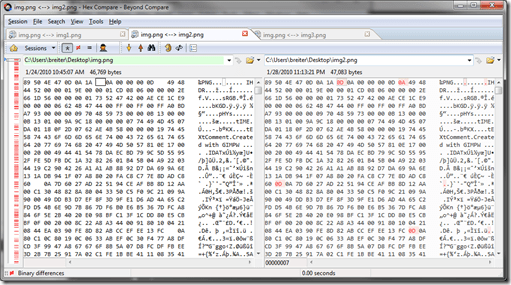
 diff-img-img2

What you see here is a lot of 0x0D bytes have been inserted in front of all of the 0x0A bytes.

PS> (ls .\img2.png ).Length - (ls .\img.png ).Length
314

There are actually 314 of these 0x0D bytes added. What the heck is 0x0D? It is Carriage Return (CR). 0x0A is Line Feed (LF). In a Windows text file each line is marked with the sequence CRLF. 314 is exactly the number of CRLF sequences you need to turn a 315 element array of strings into a text file with Windows line endings.

Here’s what is happengin. PowerShell is making some assumtions:

  1. Anything streaming in as raw bytes is assumed to be text
  2. The text is converted into an array by splitting on bytes that would indicate an end of line in a text file.
  3. The text is reconstituted by out-file using the standard Windows end of line characters.

While this will work just fine with any kind of text, it is virtually guaranteed to corrupt any binary data. With the default text encoding you get a doubling of the original bytes and a bunch of new 0x0D bytes, too. The corruption fundamentally happens when the data is split into a string array. Using a binary encoder at the end of the pipeline doesn’t put the data back correctly because it always puts CRLF at the end of every array element. Unfortunately since there is more than one possible end of line sequence, this is as good as anything. Using a Windows to Unix conversion will not fix the file. There is no way to put humpty dumpty back together again.

To Sum Up, Just Don’t Do It

The moral is that it is never safe to pipe raw binary data in PowerShell. Pipes in PowerShell are for objects and text that can safely be automagically converted to a string array. You need to be cognizant of this and use Stream objects to manipulate binary files.

When using curl with PowerShell, never, never redirect to file with >. Always use the –o or –out <file>switch. If you need to stream the output of curl to another utility (say gpg) then you need to sub-shell into cmd for the binary streaming or use temporary files.

WONTFIX: select(2) in SUA 5.2 ignores timeout

With Windows Server 2003 R2, Microsoft incorporated Services for UNIX as a set of operating system components. The POSIX subsystem, Interix, is called the Subsystem for UNIX Applications (SUA) in Windows Server 2003 R2 and later.

Interix is the internal name of the Windows Posix Subsystem (PSXSS) that is based on OpenBSD and operates as an independent sister subsystem with the Windows subsystem (aka CSRSS or Client/Server Runtime Subsystem).

With the first version of SUA, aka Interix 5.2, Microsoft added a bunch of new UNIX APIs. Unfortunately the broke some things that were previously working in the previous edition which was called Interix 3.5 (aka Services for UNIX 3.5).

For example, select(2) is broken in SUA 5.2. It completely ignores the timeouts provided as arguments and returns immediately.

From the POSIX specification:

If the timeout parameter is not a null pointer, it specifies a maximum interval to wait for the selection to complete. If the specified time interval expires without any requested operation becoming ready, the function shall return. If the timeout parameter is a null pointer, then the call to pselect() or select() shall block indefinitely until at least one descriptor meets the specified criteria. To effect a poll, the timeout parameter should not be a null pointer, and should point to a zero-valued timespec structure.

Here is a little test program. What should happen is that select() should block for 10 seconds every time through the loop.

#include <stdio.h>;
#include <sys/time.h>

int main()
{
	printf("Testing select(2). Each pass through the loop should pause 10 seconds.\n\n");

	struct timeval time, pause;
	pause.tv_sec  = 10;
	pause.tv_usec = 0;
	int i;

	for( i=0; i&lt;10; i++ )
	{
		//insert a 10 second pause on every loop to test select().		
		gettimeofday(&amp;time, 0);
		printf(";Current time: %d\n", time.tv_sec);
		time.tv_sec += 10L;
		printf("Add 10 seconds: %d... And pause by calling select(2).\n", time.tv_sec);
		(void) select(0, 0, 0, 0, &pause);
	}
	return 0;
}

What actually happens is select() returns immediately.

% uname -svrm
Interix 5.2 SP-9.0.3790.4125 EM64T
% gcc selecttest.c -o selecttest 
% ./selecttest 
Testing select(2). Each pass through the loop should pause 10 seconds. 

Current time: 1142434664 
Add 10 seconds: 1142434674... And pause by calling select(2). 
Current time: 1142434664 
Add 10 seconds: 1142434674... And pause by calling select(2). 
Current time: 1142434664 
Add 10 seconds: 1142434674... And pause by calling select(2). 
Current time: 1142434664 
Add 10 seconds: 1142434674... And pause by calling select(2). 
Current time: 1142434664 
Add 10 seconds: 1142434674... And pause by calling select(2). 
Current time: 1142434664 
Add 10 seconds: 1142434674... And pause by calling select(2). 
Current time: 1142434664 
Add 10 seconds: 1142434674... And pause by calling select(2). 
Current time: 1142434664 
Add 10 seconds: 1142434674... And pause by calling select(2). 
Current time: 1142434664 
Add 10 seconds: 1142434674... And pause by calling select(2). 
Current time: 1142434664 
Add 10 seconds: 1142434674... And pause by calling select(2).
% 

The test run above should have taken 100 seconds but it actually completes in less than 1 second. This is a problem because many UNIX applications will use select() as a timing mechanism. Some will use select() as a timer even if they aren’t doing IO.

There is good news and bad news.

The bad news is that MSFT told me that the won’t fix this issue. Their official guidance is to use sleep(2) and usleep(2) to control timeouts in Interix 52.

The good news is that select(2) works properly on Interix 6.0 with Windows Vista and Windows Server 2008.

Fix Adobe’s broken PDF preview in x64 Windows

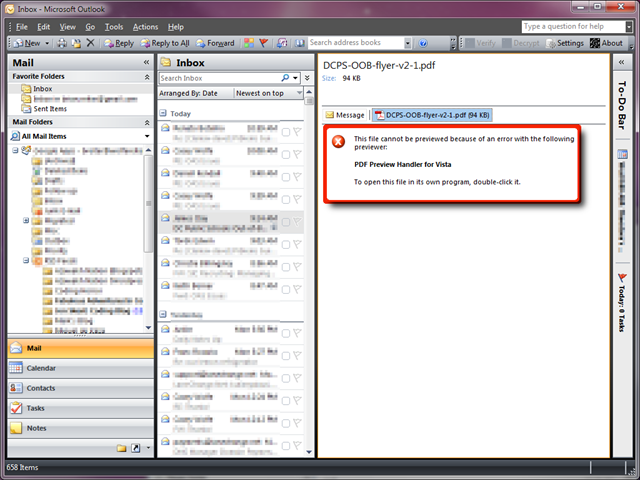
Adobe’s PDF previewer control doesn’t work correctly in x64 Windows because the Adobe Acrobat installer has a bug since June 2007. To be clear, the PDF preview handler works fine on x64 Windows but the Adobe Acrobat Reader setup program doesn’t install it correctly.

This affects previews in the Explorer shell and Outlook 2007/2010.

broken-pdf-preview

Fortunately, Leo Davidson has solved the problem and developed a little utility to fix the Adobe PDF preview control on x64 Windows.

fixed-pdf-preview

Wow. This installer defect has been there for what, 2 1/2 years. Seriously Adobe, this is just sad. Please fix it and while you are at it, send a nice thank you to Leo for solving the issue.

Outlook 2007 in Curmudgeon Mode

I am fed up with HTML email. I’m not sure if I just got one too many horrible emails with fuchsia comic sans text on a mauve background or white text on black background which becomes black text on black background after reply or forward. Or maybe it was the series of HTML email security disasters in Outlook 2002 from Office XP that could sploit you by just previewing a message. Probably both.

Regardless, I started reading all of my Outlook email as plain text in early 2002. I rarely want to look at the messages in HTML. I just I want everything to be plain text by default. That probably makes me a tech curmudgeon but life is so much better this way.

  • Phishing looks much more fishy in plain text because the evil URLs are exposed.
  • I get to choose the most readable font and color—Consolas 10.5 Black—instead of the sender—Comic Sans MS 12 Pink. (Seriously, I have known several people love to send email in big pink comic sans.)
  • The Internet Explorer (mshtml) HTML rendering engine is not invoked unless I specifically request the email to be displayed as HTML.
  • Rendering plain text defeats web beacons and exposes tracking URLs that marketing people hide in HTML email to track your behavior.

HTLM email is really most useful for marketing campaigns, hackers and phishers. The simplest way to opt-out of the target pool is to opt-out of HTML email.

Since Outlook 2002 SP1, Outlook has the capability to string HTML from incoming messages and display them as plain text. It started out as a registry tweak when the feature was rolled out with SP1 for Office XP, but it is now a full-fledged option.

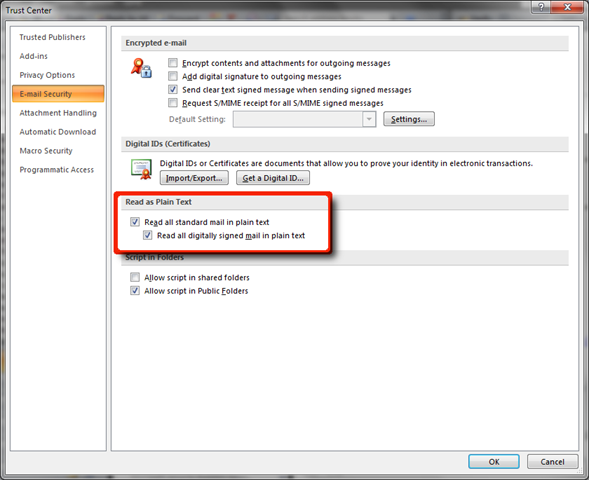
Tools > Trust Center > Email Security

Check the “Read all standard mail in plain text” option.

outlook-trust-center

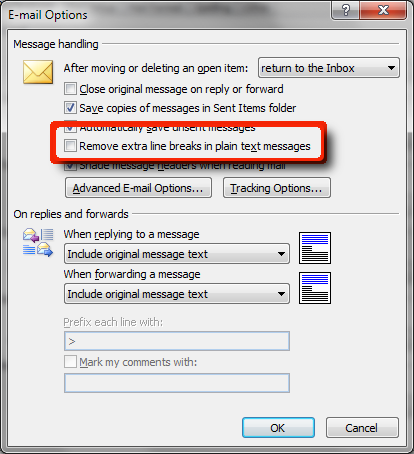
Outlook has a dubious feature whereby it attempts to remove “extra” line breaks from plain text messages by default.

And I also don’t want Outlook to reformat my plain text because it messes up code, other deliberate formatting and PGP signed messages.

Tools > Options > Email Options (button)

Uncheck “Remove extra line breaks in plain text messages”

dont-reformat-plain-text

Bruce Schneier: U.S. enables Chinese hacking of Google

Notable cryptographer and security expert Bruce Schneier has a new essay up at CNN.

In order to comply with government search warrants on user data,Google created a backdoor access system into Gmail accounts. This feature is what the Chinese hackers exploited to gain access.

This problem isn’t going away. Every year brings more Internet censorship and control, not just in countries like China and Iran but in the U.S., the U.K., Canada and other free countries, egged on by both law enforcement trying to catch terrorists, child pornographers and other criminals and by media companies trying to stop file sharers.

The problem is that such control makes us all less safe. Whether the eavesdroppers are the good guys or the bad guys, these systems put us all at greater risk. Communications systems that have no inherent eavesdropping capabilities are more secure than systems with those capabilities built in. And it’s bad civic hygiene to build technologies that could someday be used to facilitate a police state.

Read the entire article at CNN.com. This essay is a follow-up to a previous Schneier essay, “Technology Shouldn’t Give Big Brother a Head Start”.


Schneier is the inventor of the Blowfish and TwoFish block cypher algorithms as well as the Solitair cypher used in Neil Stephenson’s Cryptonomicon. TwoFish was a finalist to become the NSA’s advanced encryption standard (AES) but ultimately lost the competition to Rijndael.