“Security Suite” Subscriptions are the Dumbest Idea in Computer Security

I recently came across a 2005 essay by Marcus Ranum entitled “The Six Dumbest Ideas in Computer Security”. #1 on Ranum’s list is “Default Permit”.

Another place where "Default Permit" crops up is in how we typically approach code execution on our systems. The default is to permit anything on your machine to execute if you click on it, unless its execution is denied by something like an antivirus program or a spyware blocker. If you think about that for a few seconds, you’ll realize what a dumb idea that is. On my computer here I run about 15 different applications on a regular basis. There are probably another 20 or 30 installed that I use every couple of months or so. I still don’t understand why operating systems are so dumb that they let any old virus or piece of spyware execute without even asking me. That’s "Default Permit."

#2 on Ranum’s list is a special case of #1 which he calls “Enumerating Badness”. Basically what that boils down to is keeping a running list of “bad” stuff and preventing that from happening.

"Enumerating Badness" is the idea behind a huge number of security products and systems, from anti-virus to intrusion detection, intrusion prevention, application security, and "deep packet inspection" firewalls. What these programs and devices do is outsource your process of knowing what’s good. Instead of you taking the time to list the 30 or so legitimate things you need to do, it’s easier to pay $29.95/year to someone else who will try to maintain an exhaustive list of all the evil in the world. Except, unfortunately, your badness expert will get $29.95/year for the antivirus list, another $29.95/year for the spyware list, and you’ll buy a $19.95 "personal firewall" that has application control for network applications. By the time you’re done paying other people to enumerate all the malware your system could come in contact with, you’ll more than double the cost of your "inexpensive" desktop operating system.

The prices have gone up a bit with inflation:

  • Norton Internet Security Suite $70/year
  • Kaspersky PURE Total Security $90/year
  • McAfee Total Protection $90/year

Basically what you get for your $60-90/year is a system that double-checks everything that you try to do isn’t something bad that it knows about and if it is tries to stop it and if it lets something nasty happen tries to fix it later. You have no guarantee that something bad won’t happen because your computer still defaults to executing all code and, as a bonus, your expensive new computer now runs like molasses.

Default Deny is an Available Option in Windows 7 (but not by default)

Windows 7 ships with a semi-obscure enterprise feature called AppLocker. What AppLocker can do is deny execution to all programs, scripts, installers and DLLs by default. Instead of the normal situation where everything runs, only the code that matches ApplLockers known-good rules is allowed to execute. It works in conjunction with non-administrator user accounts to ensure that the only code executing on your system is code you want executing. This sleeper that nobody has ever heard of is more effective at stopping malware than any security suite on the market can ever be.

Why does this work? Your every day account has limited rights so it can’t write files into protected parts of the operating system but only software installed into protected parts of the operating system are allowed to execute. That means its impossible to execute downloads, email attachments, files on USB drives or whatever. Even if your browser or a plugin like Flash is exploited by malicious code in a web page, it is severely limited in the damage it can do. The usual end game of browser exploit code is to download malware onto your computer, install it somewhere and execute it. With an AppLocker default deny policy the end game can’t happen. This makes an anti-malware system something of an afterthought. Antimalware software becomes nothing more than good hygiene rather than the beachhead of your computer security, so make sure to use something that is free, lightweight and unobtrusive.

The catch is that AppLocker is an “Enterprise” feature that is only available in Windows 7 Enterprise or Ultimate editions. Also, there is configured through the Group Policy enterprise management tool which is targeted at professional systems administrators rather than normal people.

It turns out to also be cheaper to upgrade to Windows 7 Ultimate than to pay for 3 years of anti-malware. Let’s assume that your computer has a 3-year life.

Windows Anytime Upgrade Price List

  • Windows 7 Starter to Windows 7 Ultimate: $164.99 or $55/year amortized over 3 years
  • Windows 7 Home Premium to Windows 7 Ultimate: $139.99 or $47/year amortized over 3 years
  • Windows 7 Professional to Windows 7 Ultimate: $129.99 or $43/year amortized over 3 years

Even if it weren’t cheaper than massive security suites, enabling a default deny execution policy is so fundamentally right it is crazy not to do it. Any corporate IT department deploying Windows 7 without enabling AppLocker is either incompetent or the organization places no value on information security. For home users, the configuration is doable but it is “enterprisey” which means the configuration interface is too daunting for most people.

If Microsoft cares about protecting its users, it should enhance AppLocker so that it has a consumer-friendly configuration interface and it should turn on AppLocker by default in all SKUs, just like the Windows Firewall is on by default.

The day can’t come soon enough that Windows ships with a default deny firewall and a default deny execution policy and limited rights users by default. Maybe it will all come together in Windows 8.

Submitting an MVC Ajax.BeginForm Using JavaScript and jQuery

The Ajax.BeginForm() helper method in ASP.Net MVC generates a bit of inline JavaScript attached to the onsubmit event of the form. When the form is submitted in the usual manner with a submit button the request is sent using XMLHttpRequest and the result is returned into the <DIV /> of your choice. However, if you want try to submit the form using JavaScript things are less tidy.

For my example, imagine a user account management tool that displays a grid of accounts and has a number batch of operations that you can perform against the grid data in an Ajax-y manner.account-mgmt

The idea here is that you could, for example, check a number of accounts and then click disable and those accounts would be disabled. The result of your operation gets written into a notification <DIV />.

Here’s the naïve implementation for submitting an MVC Ajax form.

jQuery().ready(function () {
	//other stuff including jqGrid initialization here...

	//'grid' is the id of the jqGrid table element
	//'disableKeys' is the id of the Ajax form we are submitting.
	$('form#disableAccounts').find('a.submit-link').click(function () {
	    //work to set the state of the form before sending it to the server here...
	    $('form#disableAccounts').submit();
	});
)};

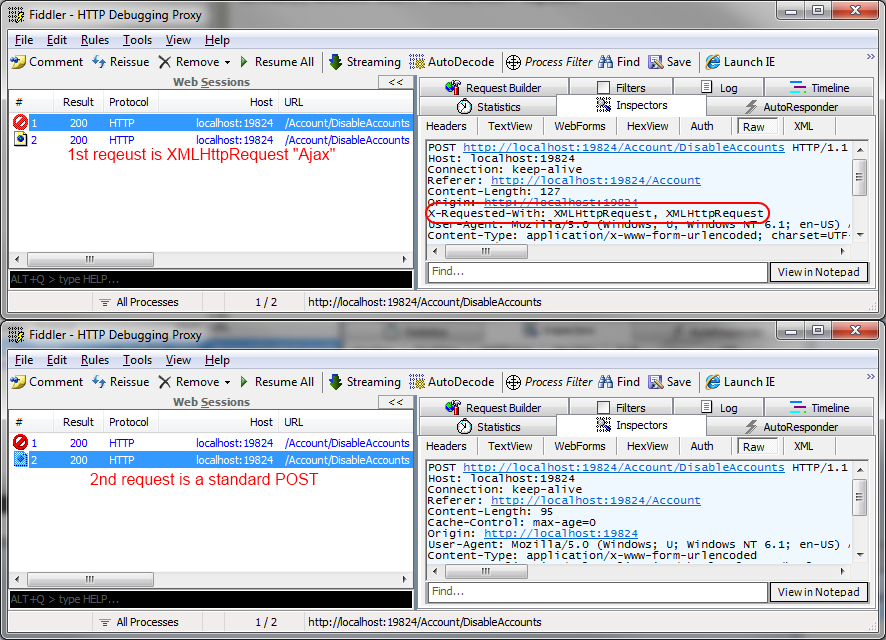
Unfortunately, this doesn’t do at all what we want. What you end up with is the text that was intended for the notification <DIV /> replacing the entire window contents. In other words, a classic POST. But wait, there’s more.

debug-double-post

What actually happens is that the request is submitted twice! The first version is Ajax and the second is classic POST, interrupting the Ajax response.

The First Solution

My initial approach to solving this double-submit problem hinged on leveraging the fact that Ajax.BeginForm() generates a <FORM /> tag with some JavaScript attached to the onsubmit event to handle the Ajax behavior. Why not just trigger the onsubmit event directly?

jQuery().ready(function () {
	//other stuff including jqGrid initialization here...

	//'grid' is the id of the jqGrid table element
	//'disableKeys' is the id of the Ajax form we are submitting.
	$('form#disableAccounts').find('a.submit-link').click(function () {
	    //work to set the state of the form before sending it to the server here...
	    $('form#disableAccounts').trigger('onsubmit');
	});
)};

This works great except in Safari where nothing happens at all.

The Final Solution

I tried a number of different techniques to suppress the default form POST behavior. The one that worked in IE, Firefox, Chrome and Safari is to attach a new event handler to the submit event that always returns false.

jQuery().ready(function () {
	//other stuff including jqGrid initialization here...

	//prevent the form from submitting in a non-Ajax manner for all browsers
	$('form#disableAccounts').submit(function (event) { eval($(this).attr("submit")); return false; });

	//'grid' is the id of the jqGrid table element
	//'disableKeys' is the id of the Ajax form we are submitting.
	$('form#disableAccounts').find('a.submit-link').click(function () {
	    //work to set the state of the form before sending it to the server here...
	    $('form#disableAccounts').submit();
	});
)};

This works to suppress the second standard POST and allow the ASP.Net Ajax behavior to complete as expected.

Configuring ASP.Net MVC for the Microsoft Charting Control

There are a couple of gotchas when using either the .NET 3.5 add-on charting control or the one that ships with .NET 4.0 with ASP.Net MVC. These can lead to some head-scratching and consternation at deployment time if you don’t know about them.

MVC Paths Break Chart Images

MVC paths are RESTful which means that a lot of the path in a URL is likely to be arguments to a controller rather than an actual path to a resource. Unfortunately, by default these paths confuse the charting control which assumes that the path in the URL leads to the resource hosting the control. The net result is that invoking RESTful methods on your controller causes your chart images go missing. The solution is to use a little bit of regular expression to create a “ignore” routing rule in Global.asax.cs for ChartImg.axd which is the virtual file that generates the charting control images.

public static void RegisterRoutes( RouteCollection routes )
{
    //MSFT charting control image genertor
    RouteTable.Routes.IgnoreRoute( "{*chartimg}", new { chartimg = @".*/ChartImg\.axd(/.*)?" } ); 
    //standard default route ignore rule
    RouteTable.Routes.IgnoreRoute( "{resource}.axd/{*pathInfo}" );

    routes.MapRoute(
        "Default", // Route name
        "{controller}/{action}/{id}", // URL with parameters
        new { controller = "Home", action = "Index", id = UrlParameter.Optional } // Parameter defaults
    );
}

Charting Control Wants to Write to Your Application Root

Another problem that will show up at deployment time is that the charting control wants to write cached images to the root of your application by default and it wants to do this in the security context of the invoking user. That is, in order for this default to work, anonymous web users need write access to the root of your application. This is a bad, bad, bad idea.

Fortunately this behavior can be configured in the Web.config. You can change the cache directory or use global application memory or session to store the images. Using memory has the advantage that you don’t need to give anybody permission to write into the server file system.

<configuration>
  <appSettings>
    <add key="ChartImageHandler" value="storage=memory;timeout=20;privateImages=false" />
  </appSettings>
<configuration>

The full set of configuration options are described on MSDN.

Simple ASP.Net MVC Globalization with Graceful Fallback

We recently began work on a website project using ASP.Net MVC 3.0 where one of the requirements was that the site will be globalized into different languages. However, one of the design considerations is that the content is going to be originally produced in English and then translated and published as available into the other supported languages. What the site needs to do is gracefully degrade to English when the desired globalized content is not available.

Other issues are that some languages are wordier or  more compact than English which can affect the graphic design. For example “Structured Investment Vehicles” (30 characters) translates in French to “Véhicules d’Investissement Structurés” (37 characters). The French version requires 23% characters which is—roughly speaking (because of proportional fonts)—about 20% more space than the English version. It’s pretty typical for French phrases to contain 20-30% more characters than the English equivalent which means that resource file strings and just swapping out text can ruin the visual design layout. What is needed is re-layout of parts of views to accommodate the space consumed by different languages.

The idea is that we have English as an invariant which has every view the site uses in the normal place. We then have a /Views/Globalization directory which contains a subdirectory with the ISO 639-1 two-letter macro-language code ( ar = Arabic, fr = French, es = Spanish, etc.) which contain whatever translated content is available. If the browser requests a particular non-English language translation, we want to views to come from the appropriate Globalization directory  but if the content doesn’t exist, we fall back to English.

Our solution is to use views, partial views and master pages as the unit of globalization. In order to do this we created a new IViewEngine which extends whatever view engine we would otherwise be using. Our team is comfortable with WebForms so we extended WebFormViewEngine.

Example View Layout

/Views
    /Globalization
        /ar
            /Home
                /Index.aspx
            /Shared
                /Site.master
                /Navigation.aspx
        /es
            /Home
                /Index.aspx
            /Shared
                /Navigation.aspx
        /fr
            /Home
                /Index.aspx
            /Shared
    /Home
        /Index.aspx
    /Shared
        /Error.aspx
        /Footer.aspx
        /Navigation.aspx
        /Site.master

In the sample above, French is not fully globalized so when French views are served, the Navigation.ascx partial view should be served from /Views/Shared/Navigation.ascx, the Arabic views declare themselves as using the /Views/Globalization/ar/Shared/Site.master rather than /Views/Shared/Site.master and the default English Error.aspx view is always served.

jQuery Script to Switch Languages

/// <reference path="jquery-1.4.4.js" />
/// <reference path="jquery.cookie.js" />

//declare namespace to avoid collisions with extension js in the browser
var mySiteNamespace = {};

mySiteNamespace.switchLanguage = function (lang) {
    $.cookie('language', lang);
    window.location.reload();
};

$(document).ready(function () {
    // attach mySiteNamespace.switchLanguage to click events based on css classes
    $('.lang-english').click(function () { mySiteNamespace.switchLanguage('en'); });
    $('.lang-french').click(function () { mySiteNamespace.switchLanguage('fr'); });
    $('.lang-arabic').click(function () { mySiteNamespace.switchLanguage('ar'); });
    $('.lang-spanish').click(function () { mySiteNamespace.switchLanguage('es'); });
});

This little JavaScript attaches a switchLanguage function to elements (such as <a/>) which declare the specified css classes. It sets a language cookie which our custom IViewEngine is looking for.

Extending WebFormViewEngine

The key methods to override when extending WebFormViewEngine are CreatePartialView and CreateView. What we need to do is detect what language the browser is requesting and then choose the correct globalized view if it exists and fall back to the default behavior if it doesn’t. For simplicity, I’m showing code that uses a cookie to determine what language the end user wants but this detection can be as sophisticated as you like.

using System;
using System.Collections.Generic;
using System.Linq;
using System.Web;
using System.Web.Mvc;
using System.Text.RegularExpressions;
using System.IO;

namespace System.Web.Mvc
{
    public sealed class WebFormGlobalizationViewEngine : WebFormViewEngine
    {
        protected override IView CreatePartialView( ControllerContext controllerContext, string partialPath )
        {
            partialPath = GlobalizeViewPath( controllerContext, partialPath );
            return new WebFormView( controllerContext, partialPath, null, ViewPageActivator );
        }

        protected override IView CreateView( ControllerContext controllerContext, string viewPath, string masterPath )
        {
            viewPath = GlobalizeViewPath( controllerContext, viewPath );
            return base.CreateView( controllerContext, viewPath, masterPath );
        }

        private static string GlobalizeViewPath( ControllerContext controllerContext, string viewPath )
        {
            var request = controllerContext.HttpContext.Request;
            var lang = request.Cookies["language"];
            if( lang != null &&
                !string.IsNullOrEmpty(lang.Value) &&
                !string.Equals( lang.Value, "en", StringComparison.InvariantCultureIgnoreCase ) )
            {
                string localizedViewPath = Regex.Replace(
                    viewPath,
                    "^~/Views/",
                    string.Format( "~/Views/Globalization/{0}/",
                    lang.Value
                    ) );
                if( File.Exists( request.MapPath( localizedViewPath ) ) )
                { viewPath = localizedViewPath; }
            }
            return viewPath;
        }
    }
}

Registration in Global.asax.cs

The final step is to register WebFormsGlobalizationViewEngine when the Application.Start event fires.

protected void Application_Start()
{

    ViewEngines.Engines.Clear();
    ViewEngines.Engines.Add( new WebFormGlobalizationViewEngine() );

    // rest of application start stuff
}

Summing Up

There are a lot of ways to globalize content. This solution has the advantage of being straightforward and flexible. The main disadvantage is that we have to maintain translations of all the views and partial views.

BitCoin is Fatally Flawed

BitCoin is a peer-to-peer virtual currency based on strong cryptography that is starting to gain some traction for use in transactions for real-world goods and services. It recalls plot devices from Neal Stephenson’s Cryptonomicon  or Daniel Suarez’s Freedom™ where major characters are involved in a nascent new economy based on some form of cryptographic cyberbucks. To a certain extent virtual currencies are not new. Edward Castronova has shown that virtual currencies in massively muliplayer online games (MMO) have virtual currencies that exchange into hard currencies and therefore the MMO worlds have GDPs that rival large nations. People will exchange hard currency for virtual goods. Consider that Zynga (Farmville, Mafia Wars) earned half a billion US Dollars selling virtual goods in 2010.

The thing that is different about BitCoin is that it is a peer-to-peer system and as such there is no central bank to control the money supply and no middle-man to mediate transactions. Transactions are anonymous, and secured through a public key cryptogrpahy system.The record of every transaction is stored on every BitCoin node. Ownership of BitCoins is established by possessing the private key used in transactions to acquire coinage.

Instead of a central bank, BitCoin uses a complex, brute-force mathematical function to generate currency. As nodes come online, the peers scale the difficulty of solving the problem such that over time the rate of currency creation will decline as it approaches a maximum of 21 million BitCoins in circulation.

My critique of BitCoin doesn’t depend on the cryptography. I’m willing to stipulate that the system is adequately secure for the purposes of this discussion.

The problem lies in the cap of 21 million BitCoins being created as well as inevitable loss of private keys which will cause coinage to permanently fall out of circulation. This is a deflationary system.

BitCoin is a Deflationary Currency System and That’s Bad

Let’s do a thought experiment. Suppose that the world lost confidence in US Dollars, UK Pounds and Euros and instead BitCoin became the standard transactional currency. Currently, a BitCoin trades can be exchanged for roughly one US Dollar, but if it were used widely by billions of people the exchange rate would have to change such that a single BitCoin is worth millions of Dollars. This is because the supply of BitCoins is capped at 21 million. Anyone who acquired BitCoins now at one-to-one exchange rate and held on to them would be a huge winner.

BitCoins can be traded in fractions up to 8 decimal places. If BitCoin were to ever to become a general currency used by billions, this precision would not be enough for minimum transactions to be small enough to buy consumable goods.

But wait, there’s more.

Suppose you are an appliance dealer. You buy appliances in BitCoin and sell them at a later time in BitCoin. But because the value of BitCoin is always increasing, you may well be forced to sell your appliances for fewer BitCoins than you paid for them. Loans have to be paid back with money that is more valuable than the money that was loaned. Even a 0% loan is unattractive if it must be paid back with currency that is worth 10% or 20% more than what was loaded. It becomes unprofitable to be in business. It becomes too risky to take a loan to start a new business. Money becomes more valuable but it goes out of circulation because everyone is terrified to spend it.

This scenario is call a deflationary spiral. BitCoin is designed to work like the Gold Standard in that it is a fixed pool of currency. But the fact is that having a fixed pool of currency is incredibly dangerous. The Gold Standard caused the Great Depression in the 20th Century and the Panic of 1837 in the 19th century. If you’re not convinced, I recommend listening to “Gold Standard, R.I.P” from NPR’s Planet Money podcast.

I don’t think BitCoin will ever come to this. Long before there is a Great BitCoin Depression, the world will have realized that it is a flawed monetary system. I think we’re much more likely to end up with in a future that conducts business in Facebook Credits than BitCoin.

Related Listening

C# in Depth 2nd Edition for Kindle but not from Amazon

skeet2_cover150Jon Skeet blogged this morning that C# in Depth 2nd edition is now available on Kindle. The original C# in Depth is just about the best programming book I’ve ever read, so I will definitely check this out. Don’t look on the Amazon Kindle store, though. Manning is self-publishing eBooks through its own website in PDF, epub and mobi. Mobi is the un-DRMed proto-format of Kindle and is read by Kindle devices and the Kindle desktop software. Interesting.

petricek_cover150Before I get C# in Depth 2nd Edition, though, I think I’ll check out Real-World Functional Programming by Tomas Petricek and Jon Skeet. This book is about both F# and C# (surely mostly LINQ). I’ve been playing around with Haskell lately and while it is interesting, it doesn’t seem all that practical. F# seems like a more approachable language and it targets .NET/Mono so it can mix with C# code that already exists and generally seems likely to be more immediately practical for real-world projects.

Also, if you have never heard of Jon Skeet, he’s an over-achiever who knows more about C# than just anyone not on the compiler team at Microsoft and he has by far the highest score on Stack Overflow. I don’t know how he has time for all of this because his day job has him working at Google in Java on the Android Market. He was interviewed on This Devleoper’s Life 1.1.3. Give it a listen.

Replicating My Key Android App Features on iOS

PwnTunes-IconPwnTunes (€10) == Android Mass Storage USB Device

Android is mostly cloud-focused. You don’t sync it with a PIM or iTunes. If you want to put music on the Nexus One or get your pictures off you can just plug it into a computer. Android presents itself as a USB drive.  You can simply copy files back and forth between the device and the computer. Incidentally, this is exactly how the Kindle and my Nikon D200 work as well.

PwnTunes is a Cydia app which requires that your iPhone is jailbroken but it pretty much replicates the Android behavior. I was willing to pay €10 for this convenience because I’m an iTunes rebel. I buy my music from Amazon’s MP3 store and I don’t even have iTunes installed on my Windows partition where I spend the vast majority of my time.

PwnTunes Update

PwnTunes is horrible. It does not work well at all. Unfortunately, there is no substitute for iTunes for i-devices.

bria-iconBria iPhone App ($8) == SipDroid

I have a SIP account on Callcentric which allows me to make calls in the US without any international phone charges when I’m abroad. My SIP account is also tied to my Google Voice number so when I get a call on my main USA number it rings through to me anywhere in the world provided that my phone has data service. Bria is working really well for me so far. I’d say that the background service and notification features of Android  is more favorable to this sort of thing. It does seem that iOS will occasionally decide to kill Bria, I think. It’s hard to tell.

gvoice-iconGoogle Voice == Google Voice

Apple has approved the Google Voice app for iOS so it is now available on the iPhone. Incidentally, the iTunes store on iOS makes this much easier to install than the Android Market because if your SIM is not on one of the whitelisted carriers in Google Market, Google Voice doesn’t appear. The iTunes store has no such issue.

Podcaster ($2) == Google Listenpodcaster-icon

Google Listen is a podcatcher which downloads and caches podcasts over the air. It’s a little flaky but it mostly works. It’s another one of the apps that is hidden in Google Market for some carriers. Podcaster does the same thing for iOS and has a much nicer user interface than Google Listen. I really like Podcaster but my main complaint is that the scheduled polling of podcasts doesn’t seem to be reliable when Podcaster is running in the background.

kindle-iconKindle == Kindle

On the one hand this is essentially the same reading experience as the Android version. On the other hand, the Android version is more feature-ful because of the subscription content struggle between Amazon and Apple. The iOS version of Kindle cannot receive periodical subscriptions.


nytimes-iconNY Times == NY Times

Nothing to see here. The Android and iOS versions are nearly identical if you allow for the differences in standard interface widgets on the platforms.


gtranslate-icon

Google Translate == Google Translate

Again this is the same app on iOS as on Android. It’s very cool if a bit Eurocentric. Don’t expect it to hear and speak Arabic or Asanti Twi. On the other hand it is great at hearing and speaking French, Spanish, German and Dutch. It speaks Danish but can’t hear Danish and it hears Afrikaans but can’t speak it. Something interesting is going on there.

Bonus: Flickrflickr-icon

iOS has a cool Flickr app that will background upload photos to your Flickr stream and can also edit tags and sets in Flickr as well as browse your friends Flickr streams. Nicely done.


Bonus: OneNote

onenote-icon

I have OneNote and use it off and on. OneNote 2010 syncs with Microsoft’s cloud storage and this cool little iOS app also syncs with Microsoft’s cloud storage. If you take notes on an iDevice they show up in OneNote on Windows and vice-versa. My main complaint is that syncing a notebook for the first time is pretty slow over 3g. Jury is still out on this one but I’m giving it a whirl.

Nexus One Came Back to Life After a Soaking

I’ve had my Nexus One in a bag of rice for the last 5 days to draw the water out of it. I put the battery back in this morning and it booted up with a working touch screen and no evident ill effects except that it has decided to erase all my personal data and apps.

All of the data on it is synced onto cloud services and onto my iPhone and desktop so nothing is lost. It is a big hassle to get apps back on the Nexus One though because the Android Market store has some really unfortunate carrier blocking. Some apps such as GMail, Google Listen, Google Voice and Amazon Kindle do not appear in the store unless the carrier identified by your SIM is white-listed with Google. This is one thing that Apple seems to get really right. The iOS App Store seems to work regardless of locality or carrier.

I’ve decided to stick with iPhone for a while. iOS 4 is a significant improvement. It seems to achieve most of the key benefits that Android has while retaining a slicker GUI and avoiding the glitchy touch-screen registration issues and periodic hangs that I experience regularly with Android 2.2 on the Nexus One.

Drowned Nexus One

Last Thursday, I was caught out in a serious deluge of a storm and was thoroughly soaked to the skin. When I got home, I pulled my Nexus One out of my pocket and watched in horror as the screen flickered and died. I have the Nexus One in a bag of rice hoping it will dry out and revive but I can say this is one area where the iPhone design is better. My iPhone 3Gs was more water resistant. I was drenched in a similar way in a rain storm with my iPhone in my pocket and it survived without any water damage. I chalk this up to the don’t-open-me sealed design of the iPhone case vs the pop-open Nexus One with a removable battery. I do seem to manage to destroy phones at about the one-year mark with alarming predictability, though, regardless of manufacturer.

Time to get another phone and quickly. I’m willing to pay for an unlocked device rather than wasting my time futzing around rooting devices. That’s why I got the Nexus One in the first place. On the other hand, I’m really, really irritated that Gingerbread is still not out on the Nexus One. And the price at the Telefonika in the Accra Mall for a new Nexus One is roughly $900! At the current exchange rates, the price for a new unlocked iPhone in Ghana is nearly $1500! RIM BlackBerry phones carry a similar premium and are immensely popular here.

photo

As I’m unwilling to pay $1500 for a phone if I can avoid it, I find myself having to pull my pre-Nexus One iPhone 3Gs out of a shipping crate so that I can get it working here in Ghana. My wife has an AT&T BlackBerry which AT&T unlocked without comment but AT&T will not unlock an iPhone for any reason. (FWIW, I am still an AT&T customer. My company pays for a full monthly data plan with international roaming but I normally use Airtel in Ghana.)

These are not reasonable prices in my world. I have an iPhone locked to AT&T and running iPhone OS 3.2. What I wanted was iOS 4.2.1 but I wasn’t going to shell out $1500 to get it. So, despite my desire to be a good little consumer and my willingness to pay something of a premium to get an unlocked phone, I found myself researching how to jailbreak my iPhone 3Gs. It took me some time that I’ll never get back but this is what I came up with:

  1. I used Pwnage 4.1 to build a custom 4.2.1 iOS image without the baseband update from iOS 4.2.1. To do this you need the iOS image and you have to add a iPhone 3Gs 4.2.1 bundle to Pwnage. This is important because the baseband I had is unlockable using UltraSn0w but the baseband from iOS 4.2.1 is not and the solution to that problem is flashing a baseband firmware from the iPad which makes it impossible to go back to a stock iOS image.
  2. I kept getting an error from iTunes when I tried to flash the firmware onto my phone. It turns out that I needed to have iTunes 10.1 and I had whatever comes with Snow Leopard because I don’t actually use iTunes. But after doing the update to the latest iTunes 10.1.x, it worked.
  3. Then I used greenpois0n to jailbreak the phone because it seems to be the only jailbreak for iOS 4.2.1 that works without having to tether the phone to a computer for every reboot..This worked on the second try.
  4. Basically, what I had at this point was a stock 4.2.1 image with an older baseband and an extra green icon called “Loader”. What Loader does is install Cydia on the root partition and it failed because the partition was too small. Back to step 1, this time I created an image with a 1024MB root partition.
  5. Once the phone was jailbroken with Cydia on it, I was able to use Cydia to install UltraSn0w which unlocks the baseband for any SIM. Finally my phone was up and running on Airtel.

I’m not very happy about this state of affairs but there it is. I am happy to have a working phone again.

New NVidia Video Drivers Improve Graphics Subscore in Windows Experience on Boot Camp 3.2 and Windows 7 x64

nvidia-266.58-driverI have a late 2009 15” MacBook Pro Unibody (MacBookPro5,3) running Windows 7 x64 with Boot Camp 3.2. Because they are Apple, Apple doesn’t keep up to date with the video drivers for Windows. The versions that ship with Boot Camp are a couple of generations out of date.

A couple of weeks ago, NVidia released a new “Verde Notebook” driver which supports my MackBook Pro: GeForce 9600M GT Verde Notebook drivers release 265 v266.58 WHQL. The actual driver version reported by Device Manager is 8.17.12.6658 built 1/7/2011.

After creating a restore point, I went ahead and installed it although I did not elect to install PhysX or NVidia 3D Vision, neither of which have any use for me.

It just occurred to me to update the Windows Experience meter thingy. I didn’t expect any change but I was pleasantly surprised to find my Graphics and Gaming Graphics subscores increased slightly from 6.4 to 6.5 with no negative side-effects so far. This doesn’t make much if any difference at all in the real world but it feels nice.

graphics-score-nvidia-notebook-2066.58