Eek out more sound on Win7 laptops

This falls in the category of why isn’t it the default?

Laptops generally have really tiny speakers and it can be tough to hear them sometimes. Sometimes the root problem is a poorly configured driver from the OEM, such as I had with my MacBook Pro 15” 2nd gen unibody. (The updated crystal audio driver in Boot Camp 3.1 or the slightly older one from Boot Camp 2.2 fixes this.) Even so, the audio has to be cranked all the way up to watch video through the laptop speakers.

It’s not just an Apple problem, either. My HP nw8440 was even more anemic in the volume department.

Windows 7 has a buried optimization that helps a lot: “Loudness Equalization”.  The feature description states that it “uses an understanding of human hearing to reduce perceived volume differences” which implies that it really isn’t making the speakers louder but doing something to make them seem louder. I don’t know how it works its magic but it really works.

Control Panel > Sound > Playback

Double-click the device for your built-in speakers

On the enhancements tab, select “Loudness Equalization” and nothing else.

speakers-enhancement

The improvement is marked. It makes such a difference that I wonder why this feature isn’t turned on by default for built-in speakers.
Barack’s people are tracking clicks

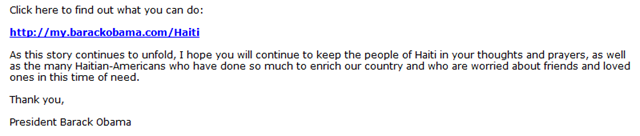
Emails sent by Barack Obama’s people often have URLs in them.

obama-haiti-html

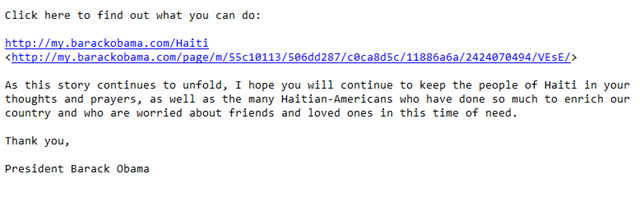
That’s fine but Mr. Obama’s people use a phishing technique where the link displayed is not the real link. My mail reader converts the emails to plain text by default, so it is obvious.

obama-haiti-txt

The text “http://my.barackobama.com/Haiti” is actually linked to some obscure URL at my.barackobama.com. This URL probably encodes information about the page to display as well as my identity. It is almost certainly there so that the people running my.barackobama.com can track my behavior if I were to click this link.

This is nothing new. Mr. Obama’s people have been doing things this way since the campaign and it is a common technique for tracking the behavior of people in email marketing campaigns. It has always bugged me, though, that Barack Obama does this.

Boot Camp 3.1, from Apple this time

Boot Camp now officially supports Windows 7. As I expected, it is largely a repackaging of drivers previously released for Boot Camp 2.2. Here’s the flyby of what is in the update (I looked at the x64 version).

  • NVidia  display driver 8.16.11.8861, 01/05/2010
  • Binary.aapltp_Bin
  • Binary.AppleBTBroadcom_Bin
  • Binary.AppleBTE_Bin
  • Binary.AppleBT_Bin
  • Binary.AppleDisplay_Bin
  • Binary.AppleiSight_Bin
  • Binary.AppleODD_Bin
  • Binary.asix_ethernet_Bin
  • Binary.AtherosWin7_Bin
  • Binary.Atheros_Bin
  • Binary.Ati_GraphicsWin7_Bin
  • Binary.Ati_Graphics_Bin
  • Binary.BroadcomEthernet_Bin
  • Binary.BroadcomWireless_Bin
  • Binary.Cirrus_Audio_Bin 6.6001.1.21 (all new!)
  • Binary.crystal_beach_Bin
  • Binary.intel_ethernet_Bin
  • Binary.IRFilter_Bin
  • Binary.Keyboard_Bin 3.0.0.0 (same version number as was in Boot Camp 3.0 but I can definitely dim the keyboard more, now)
  • Binary.marvell_ethernet_Bin
  • Binary.MultiTouchMouse_Bin
  • Binary.MultiTP_Bin 3.0.0.0 (same as in 2.2)
  • Binary.null_driver_Bin
  • Binary.Realtek_Bin
  • Binary.Sigmatel_Bin

Available from Apple in x86 and x64 flavors.

Google Developer Dashboard: “An error occurred: please try again later.”

When I use the Google Developer Dashboard to upload an update to my extension, it will often fail. The dashboard says, “An error occurred: please try again later.”.

Trying again later doesn’t help. For me, the fix is to log out and log back in again.

My First Chrome Extension, part 2

I was fixated on how to get Chrome to pass a feed URL to my registered feed reader, Outlook 2010. After I figured out how to pass the message, it was nearly a one-liner to modify an existing extension. How many things could be wrong with one line of code that seems to be working?

url = url.replace( "%f", feedUrl.replace( "http:", "feed:" ) );

There are two bugs that I see in here.

1: URLs can legitimately include %f

From RFC 1738:

In addition, octets may be encoded by a character triplet consisting of the character "%" followed by the two hexadecimal digits (from "0123456789ABCDEF") which forming the hexadecimal value of the octet. (The characters "abcdef" may also be used in hexadecimal encodings.)

In practice this would affect URLs that include these characters:

  • ð -> %F0
  • ñ –> %F1
  • ò –> %F2
  • ó –> %F3
  • ô –> %F4
  • õ –> %F5
  • ö –> %F6
  • ÷ –> %F7
  • ø –> %F8
  • ù –> %F9
  • ú –> %FA
  • û –> %FB
  • ü –> %FC
  • ý –> %FD
  • þ –> %FE
  • ÿ –> %FF

The simple solution is to avoid using a macro character sequence that includes valid hexadecimal values. Sticking with a single ASCII character it could be anything from ‘g’ trhough ‘z’ except ‘s’, which is already being used.

2: A feed URL could have “http:” anywhere

The scheme for a URI is always at the beginning, but it is common for one URI to encode another one inside it. That is exactly how you pass a feed URL to Google Reader.

Imagine a feed URL like “http://feedify.exmaple/q=http://mysite.somewhere/page”. In order to pass this to the feed scheme handler I need to replace the http: scheme with feed: but my original code would also replace the second http:, which would break the URL.

The solution is to use a regular expression so that I only replace the http: scheme rather than every occurrence of the pattern “http:”. In Regular Expression syntax, the ^ character means that the pattern has to start with the beginning of the string.

^http:

I JavaScript, the shorthand for a Regular Expression object is paired / characters:

/^http:/

3:URI schemes are not case sensitive

The replace() method of the JavaScript String object is case sensitive. My code would not work on a URL like “HTTP://mysite.example/stuff”.

Fortunately, the Regular Expression object in JavaScript has a case-insensitive match mode. You set this with the ‘i’ option:

/^http:/i

3 Bugs in 1 Line: Fixed

url = url.replace( "%g", feedUrl.replace( /^http:/i, "feed:" ) );

My First Chrome Extension

I am fairly hooked on Microsoft Outlook and I like to use the RSS reader function. I also have been living in Chrome 4 instead of Firefox for a few weeks now. One of the features of Firefox and IE is the ability to discover RSS and ATOM feeds and pass them to the registered feed reader.

Google has an extension for Chrome that almost does what I want. It discovers the feeds but it will only subscribe them with a web-based feed reader. What I did was hack on the RSS Subscriptions Extension (by Google) so that it would work with Outlook.

screen-shot

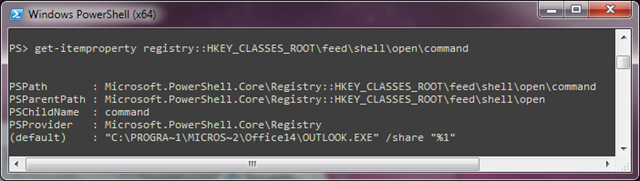
Outlook feeds by registering itself as the handler for the FEED scheme.

hkcr-scheme

That means anything that tries to invoke a URI like feed://somewhere.com/feed.rss, Outlook will be invoked with the /share switch like this:

"C:\PROGRA~1\MICROS~2\Office14\OUTLOOK.EXE"/share "feed://somewhere.com/feed.rss”

Outlook is very picky about the scheme on the URL. It has to be feed:// or it won’t work and that is the problem with the Google extension. It always puts the http:// scheme onto the URL and it assumes that you are going to embed this into a larger querystring to a web-based feed aggregator.

It was pretty easy to tweak the extension to do what I wanted. The meat of the change is really just one line of code:

url = url.replace( "%f", feedUrl.replace( "http:", "feed:" ) );

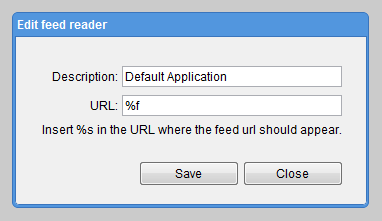
That makes it so that %f is a feed: scheme URI that will invoke the registered feed handler. For me this is Outlook 2010.

edit-shot

There is a little bit of supporting stuff here and there to make this work, but that’s the gist. Now, %f is the magic configuration to invoke the registered feed:// scheme application. It was surprisingly easy to get hacking on the extension and Google made it very easy to publish my work.

If this scratches your itch, you can get it from Chrome Extensions site.

Raymond Chen answers my question

Nearly four years ago, I asked Raymond Chen why Microsoft has continued to use cryptic 8.3 filenames in Windows even though long filenames have been supported for many years. I wasn’t paying attention when Raymond answered me a year later. I just stumbled across this today.

Commenter Brian Reiter asks a duplicate of a question that was already submitted to the Suggestion Box: Darren asks why operating system† files still (for the most part) adhere to the old 8.3 naming convention.

It comes down to a handful of interesting reasons:

  1. Once a name is chosen, it can’t be changed for reasons of backwards compatibility with applications that may load a system DLL or invoke a system executable.
  2. By default all long file names are given a short file name. Loading a DLL by reference to a short and long file name into a program will yield two separate references of the DLL in memory.
  3. 8.3 filenames are know to work. If it ain’t broke, don’t fix it. Also, a related point here is that the system component installer technology in Windows XP and prior could only support 8.3 filenames. Pretty much any system component developed prior to Vista had to have 8.3 filenames. That includes some components developed for Vista while the new installer system was under development. (There a

My original question was why does the Framework Design Guidelines for .NET applications specify a totally different naming. The gist is that while native code and legacy components have the gotchas above, .NET assemblies are different because they have additional metadata including version number and public key token. In order to dynamically load an assembly, you either need to know its strong name or its full path and filename. There is very little chance of accidentally loading the wrong assembly unless you are the one building and signing the assemblies in question.

Who is reading your email?

Email has no privacy assurance whatsoever

Email is short for “electronic mail”. The implication is that this is a direct metaphorical equivalent for the familiar paper process, but it just ain’t so. One of the points of departure from user expectation is the concept of a sealed envelope.

When you put a paper letter in a paper envelope and seal it, there is an expectation of privacy because someone has to physically break the seal which is difficult to do without obviously damaging the envelope. Email, by contrast has no secure envelope. It is transferred over the Internet using plain text over TCP port 25.

The implication is that anyone can read your mail without you realizing it. Most people think the only point of concern is that an attacker capturing packets at a public WiFi hotspot will snoop your mail. The most obvious countermeasure is using SSL with webmail. This is a good countermeasure as far as it goes but it only encrypts the communication between you and your post office. However the transport of your message between post offices is still going to be in plain text and will likely pass through several routers on the Internet en route.

So what? Who can tap traffic on those routers? Perhaps some uber-hacker is siphoning of traffic for analysis but man that seems like a huge amount of data to sift through and not likely worth doing, right?

Unfortunately Deep Packet Inspection is now ubiquitous. ISPs and governments, including the USA, have widely deployed hardware to capture and mine data out of unencrypted data packets passing through the Internet. Effectively that means it is safe to assume that all of your email (and other traffic) is being captured and analyzed by one or more automated systems trying to determine if it matches patterns of “bad behavior”. Deep Packet Inspection, by the way, is the mechanism that ISPs use to provide “tiered service” and detect copyright violations.

Maybe you think this sounds OK because you aren’t doing anything wrong, but consider whether you trust all of the people who have access to this data to do no evil, trust these people and algorithms to never make mistakes and trust that they never lose control of your private data.

A Modest Proposal

RFC 2478 describes a cryptographic mechanism similar to SSL for web sites that places a strong cryptographic layer over the transfer of email via SMTP. This transport layer security is widely supported by mail servers today and is the mechanism by which SMTP client programs like Microsoft Outlook, Mozilla Thunderbird and Apple Mail are able to communicate securely with an SMTP gateway. Many mail providers, like Gmail, already require (or at least offer) SMTP over TLS connections for clients sending mail.

RFC 2478 was published more than ten years ago. Most, if not all, contemporary SMTP gateways are capable of supporting secure SMTP over TLS. If all mail servers simply transferred all messages between each other with TLS encryption then nobody could read the messages except the administrators of the destination and source post offices and the intended recipients. This could be phased in over a reasonable period of time.

  • SMTP in the clear becomes deprecated.
  • During the deprecation period servers are configured to attempt to communicate with TLS by default.
  • After some time, administrators can configure warnings in the headers and to-line like “[UNSECURED]”. This is an important user-education step.
  • SMTP in the clear becomes a banned protocol and servers are forbidden from supporting it. (Testing and troubleshooting SMTP can still be done via classical telnet by using OpenSSL as a wrapper.)
  • Servers will refuse connections from servers that do not offer TLS which will cause the message to bounce to the sender with a statement that their mail server is not secure.

Securing all SMTP traffic in a TLS envelope would go a long way toward restoring some reality to the baseline assumption that nobody is reading email in transit. The technology has been standardized since 1999. Why do we not have secure server-to-server mail transfer ten years later?

Make your own Apple Boot Camp “3.1” update

Apple loves to tout compatibility with Windows.

Have a Windows application you need to use once in a while? No problem. Every new Mac lets you install Windows XP and Vista and run them at native speeds, using a built-in utility called Boot Camp.

There is something to this and the Apple hardware is awesome but Apple is a bit heel-dragging and sloppy about the way they release drivers for Boot Camp. For example, Windows 7 was finished July 22, 2009 but as of December 15, 2009 it is still officially unsupported by Apple. Windows 7 uses the same driver model as Vista, so that policy from Apple is just recalcitrant and disingenuous. Apple really does provide all the drivers you need to get Windows 7 x86 or x64 to run natively on Mac hardware.

On the other hand, some of the drivers in Boot Camp 3.0 are really flaky. For the latest Macbook Pros that use Cirrus Logic audio controllers, the volume is messed up so the internal speakers are un-hearable and the built-in microphone doesn’t work at all with some applications—notably Skype.

Apple actually does have updated drivers available. They are packaged as Boot Camp Drivers Update 2.2.

Setup is simple and straightforward — just as you’d expect with a Mac.

Awesome.

Except that if you are running Boot Camp 3.0, you are screwed and the setup is very not straightforward and there is no one-click installer from Apple. It is doable, though, and worthwhile.

This update addresses issues with the Apple trackpad and turns off the red digital audio port LED on laptop computers when it is not being used. It also includes support for the Apple Magic mouse and wireless keyboard. It is intended only for use with Microsoft Windows XP and Microsoft Windows Vista running on a Mac computer using Boot Camp.

If, like me, you are running Boot Camp 3.0 with Windows 7 on your MacBook Pro and you want these updates here’s what you have to do.

  • If you don’t already have it, install 7-zip.
  • Download the Boot Camp Drivers Update 2.2 for Windows from http://support.apple.com/kb/DL967
  • After you have BootCamp_Update_2.2.exe, right-click on it and select 7-zip | Extract to “BootCamp_Update_2.2\”.
  • Now you have a directory of files that includes BootCampUpdate32.msp and BootCampUpdate64.msp. The 64 version will work with Windows Vista or 7 x64.
  • Right-click on the appropriate msp file and extract it with 7-zip.
  • Now you have a directory full of weird file and folder names. One of the folders should be named “BootCamp24ToBootCamp223”. Inside there are some files that are named with the pattern Binary.*_Bin:

Binary.Cirrus_Audio_Bin –> Fixes audio levels and microphone
Binary.Keyboard_Bin –> Same version that shipped with Boot Camp 3.0
Binary.MultiTouchMouse_Bin –> Magic Mouse driver
Binary.MultiTP_Bin –>  Fixes accidental select while dragging
Binary.TrackPad_Bin –> I don’t have the older touchpad so I don’t know

    • Each of these files is an archive that you can extract with 7-zip. Once you extract them, you can install the drivers by running DPInst.exe or by pointing the Device Manager at the extracted drivers in the usual way.

Happy updating.

Now that that’s out of the way, can someone explain to me why this had to be so hard?

Why bundle these updates with a smug “Setup is simple and straightforward — just as you’d expect with a Mac” tagline but make sure that the customers who bought the latest hardware and latest OS X cannot install them? It makes no sense.

Why did Boot Camp 3.0 ask me to configure automatic driver updates from Apple but Apple doesn’t actually publish any driver updates though that channel? It makes no sense.

Facebook is utterly untrustworthy

Here are a few things to consider before putting any of your data into Facebook:

  1. Under the aegis of “we’re making some changes to give you more control,” Facebook is taking advantage of standard user click-though terms of service behavior to make your profile data public. (via Jason Calicanis)
  2. Whenever you take a Facebook quiz or use a Facebook plugin game, everything in your profile is available to the publisher of the quiz or game. Further, everything in the private profiles of all your friends is available to the widget publisher as well. The data collected by the publisher can be sold, resold or released in any way the publisher of the quiz or widget chooses. (via ACLU)
  3. The privacy controls in Facebook are deceptive and there is no way to opt out of sharing private data with Facebook apps. (via Electronic Frontier Foundation) Also, there is no screening process required for app developers. Anyone with a Facebook account can be an app developer.

Why would Facebook leak its users private data in this way? Well, they may be incompetent but it is not a compelling argument since they have built the worlds largest social network. The other possibility is that they want to convert the data in their systems into money. The leaking of private profile data to app publishers makes Facebook a wonderful platform for targeted marketing. It is particularly insidious because your data can be leaked even if you yourself are very careful but any of your friends uses any Facebook app.

Similarly, Jason Calicanis points out that the more data that is public on Facebook, the more it can be indexed by Google, Bing and Yahoo! to drive search traffic to Facebook. That traffic is monetized by selling ads.

Facebook shows an astonishing disregard for the privacy of its users. It appears to believe that its membership is too stupid to notice or care about the way that it is abusing their private data. It is amazing because the original value proposition of Facebook over MySpace was that Facebook had privacy controls. Clearly Facebook is not concerned with keeping its users data private. They are concerned with monetizing Facebook in advance of their IPO.

Perhaps it is time to send Facebook a message and delete your account.

Of course, you still have to trust Facebook to actually delete your data and they are utterly untrustworthy.