Pin Netbeans 6.9 to Windows 7 x64 Taskbar

netbeans-x64-bugIf you try to pin Netbeans 6.9 to the Windows 7 x64 taskbar and have the x64 JDK running, you get a new icon every time Netbeans runs. This is Netbeans bug 178273. The gist is that the netbeans.exe and nbexec.dll which bootstrap netbeans startup are 32-bit native binaries. Netbeans.exe can’t host the 64-bit Java so it copes by launching a child javaw process with a huge list of arguments.

nb-daughter-javaw-process

A possible solution would be to create a shortcut to Javaw with all the arguments for Netbeans and pin that to the Taskbar. Unfortunately, the list of arguments is so large that it isn’t possible to create a shortcut directly to javaw passing everything in. The list gets truncated and the shortcut doesn’t work.

A workable solution is to install the 32-bit JDK and make that the default platform for Netbeans. This works but you have to override the installer which prefers to put Netbeans into the x64 Program Files tree and use the x64 JDK if it is detected.

netbeans-32-bit-sdk-override

This does solve the problem but it’s not that pretty. The downside here is you have to maintain a second 32-bit JDK. You can still build applications with the x64 JDK but you have to fiddle around with registering the extra x64 platform in Netbeans and you have to reference the correct platform in each project.

SevenBeans Plug-In Does it Better

Jump ListSevenBeans is a Netbeans plugin that improves Netbeans Windows 7 taskbar integration. It adds jumplists, icon overlays and taskbar progress bar for background processes in Netbeans such as updating plugins. It fixes the taskbar integration whether you use the x64 or the x86 JDK

SevenBeans uses a native J7Goodies native DLL for integrating with the Windows 7 taskbar which it extracts  J7G<random-number>.tmp in your Temp directory and dynamically loads. If you are using AppLocker DLL rules, you need to create a per-user white list for C:\Users\<username>\AppData\Local\Temp\J7G*.tmp

Once SevenBeans is installed, launch Netbeans and then pin icon you have after Netbeans is up and running to the taskbar.

SevenBeans is cool and it is much nicer than dealing with an extra JDK installation that I didn’t want.

A Closer Look at the Microsoft h.264 Extension for Chrome

Today I took a closer look at how the “Windows Media Player HTML5 Extension for Chrome” works. To recap for a moment, Google announced that they are revoking native h.264 playback for the HTML5 <video/> tag in Chrome. A huge kerfuffle ensued. Yesterday, Microsoft announced that they were providing an extension to Chrome that provides h.264 support for the <video/> tag in Chrome on Windows 7.

I downloaded the CRX file and unzipped it. This is the contents:

PS> ls | select Length, Name | ft -AutoSize

Length Name
------ ----
  6540 contentscript.js
   678 manifest.json
163256 np-mswmp.dll
 59413 wmp eula.rtf
  3489 wmp releasenotes.txt
 28177 wmp128.png
   569 wmp16.png
  2233 wmp48.png

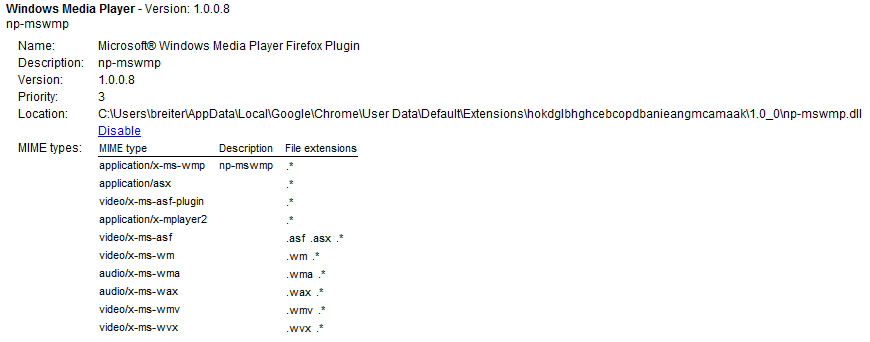
The np-mswmp.dll file looked familiar. And that is because it is the NSAPI plugin for Windows Media Player for Firefox.

ns-wmp

The remaining interesting file in the CRX is contentscript.js. In a nutshell, what this script does is look for <video/> elements that are referencing h.264 or WMV content and dynamically replace them with <object type=”application/x-ms-wmp” /> element referencing the same content.

Interesting Side-Effect

The Windows Media NSAPI plugin is installed into Chrome along with this extension which means any pages which explicitly embed the Windows Media Player will work.

wmpChrome

Also, this extension enables support for WindowsMedia Video content in <video/> elements.

var supportedMimeTypes = ['video/mp4', 'video/x-ms-wmv'];
var supportedVideoExtensions = ['.mp4', '.wmv', '.mp4v', '.m4v'];

Windows 7 Not Really Required

The Windows Media NSAPI plugin was released by the Port 25 group at Microsoft in April 2007. It doesn’t rely upon Windows 7 to work. The issue is just that Windows 7 is the first version of windows to ship with an h.264 codec for Windows Media Player. The extension should work on Windows XP and Vista if you have an h.264 codec for Windows Media, such as from the K-Lite codec pack.

Pointing the Way for Alternate Cross-Platform Implementations

This general approach also points the way for a 3rd party that has an NSAPI plugin that supports h.264 to extend Chrome (and Firefox) to support h.264 and whatever else the video player can support in the <video/> element. In particular it should be straightforward to create an extension that uses the VLC NSAPI plugin to extend the <video/> tag codec to support h.264 as well as DivX, QuickTime and MPEG-2.

Microsoft Puts h.264 Back into Chrome

Is I suspected they would, Microsoft has released an h.264 codec extension for Google Chrome to support h.264 in the <video /> tag. They provide the same mechanism for Firefox.

http://www.interoperabilitybridges.com/wmp-extension-for-chrome

This Extension is based on a Chrome Extension that parses HTML5 pages and replaces Video tags with a call to the Windows Media Player plug-in so that the content can be played in the browser. The Extension replaces video tags only if the video formats specified in the tag are among those supported by Windows Media Player. Tags that contain other video formats are not touched.

The Extension also checks if the browser version already supports MP4 (H.264) video codec, if so the extension is not used.


http://blogs.msdn.com/b/ie/archive/2011/02/02/html5-and-web-video-questions-for-the-industry-from-the-community.aspx

Any browser running on Windows can play H.264 video via the built-in Windows APIs that support the format. Our point of view here is that Windows customers should be able to play mainstream video on the Web.


Interesting.

IEnumerable<char> Random Password Generator

Last time I showed that IEnumerable uses lazy evaluation with a Fibonacci Sequence generator as an example. Perhaps a more practical example of an infinite series is a random character sequence from which you could generate passwords. This is using IEnumerable a lot like the /dev/random file in Unix.

This example is a password generator program based on a RandomCharSequence type which implements IEnumerable<char>. RandomCharSequence is again not much more than a factory for RandomCharEnumerator. The interesting thing here is that it passes the set of characters to be used in the random generation to RandomCharEnumerator. The character sets are upper, lower, digit and special and are themselves statically defined but are composable  using a CharTypes enumeration.

Like FibonacciSequence, RandomCharSequence is an infinite set. You have to limit how much of it you grab at a particular time using the Take(int) extension method from System.Linq.

RandomCharSequence as Password Generator

using System;
using System.Collections.Generic;
using System.Linq;
using System.Text;
using System.Collections;
using System.Security.Cryptography;
using System.Reflection;
using System.Collections.ObjectModel;

namespace NewPassword
{
    class Program
    {
        static void Main( string[] args )
        {
            int length = -1;
            int count  = -1;
            if( args.Length > 0 )
            { int.TryParse( args[0], out length ); }
            else
            { length = 8; }
            if( args.Length > 1 )
            { int.TryParse( args[1], out count ); }
            else
            { count = 5; }
            
            var pwdseq = new RandomCharSequence();
            for( int i = 0; i < count; i++ )
            {
                Console.WriteLine( pwdseq.Take( length ).ToArray() );
            }
        }
    }

    [Flags]
    public enum CharTypes
    {
        Lower   = 0x01,
        Upper   = 0x02,
        Digit   = 0x04,
        Special = 0x08,
        All     = Upper | Lower | Digit | Special
    }
    public class RandomCharSequence : IEnumerable<char>
    {
        static readonly IEnumerable<char> s_lower   = new[] { 'a', 'b', 'c', 'd', 'e', 'f', 'g', 'h', 'i', 'j', 'k', 'l', 'm', 'n', 'o', 'p', 'q', 'r', 's', 't', 'u', 'v', 'w', 'q', 'y', 'z' };
        static readonly IEnumerable<char> s_upper   = new[] { 'A', 'B', 'C', 'D', 'E', 'F', 'G', 'H', 'I', 'J', 'K', 'L', 'M', 'N', 'O', 'P', 'Q', 'R', 'S', 'T', 'U', 'V', 'W', 'Q', 'Y', 'Z' };
        static readonly IEnumerable<char> s_digit   = new[] { '0', '1', '2', '3', '4', '5', '6', '7', '8', '9' };
        static readonly IEnumerable<char> s_special = new[] { '!', '"', '#', '$', '%', '&', '\'', '(', ')', '*', '+', ',', '-', '.', '/', ':', ';', '<', '=', '>', '?', '@', '[', '\\', ']', '^', '_', '`', '{', '|', '}', '~' };

        //these static properties must exactly match the flags defined in the CharTypes enum
        private static IEnumerable<Char> Lower   { get{ return s_lower; } }
        private static IEnumerable<Char> Upper   { get{ return s_upper; } }
        private static IEnumerable<Char> Digit   { get{ return s_digit; } }
        private static IEnumerable<Char> Special { get{ return s_special; } }

        public RandomCharSequence() : this( CharTypes.All ){}
        public RandomCharSequence( CharTypes charTypes )
        {
            CharTypes = charTypes;
        }

        public CharTypes CharTypes {get; set;}

        public IEnumerator<char> GetEnumerator()
        {
            List<char> pool = new List<char>();
            foreach( var type in (CharTypes[])Enum.GetValues(typeof(CharTypes) ) )
            {
                //CharTypes.All is not a single bit flag. We don't want that one.
                if( type != CharTypes.All && (CharTypes & type) == type )
                {
                    //use reflection to add the static char list properties which
                    //match the flag bits.
                    pool.AddRange( 
                        (IEnumerable<char>)typeof(RandomCharSequence).GetProperty( 
                            type.ToString(), 
                            BindingFlags.Static | BindingFlags.NonPublic 
                            ).GetValue( this, null )
                        );
                }
            }
            return new RandomCharEnumerator( pool );
        }

        IEnumerator IEnumerable.GetEnumerator()
        {
            return GetEnumerator();
        }
    }

    public class RandomCharEnumerator : IEnumerator<char>
    {
        public RandomCharEnumerator( IList<char> pool )
        {
            Disposing = false;
            Pool      = new ReadOnlyCollection<char>( pool );
            Random    = RandomNumberGenerator.Create();
        }

        RandomNumberGenerator Random { get; set; } 
        public IList<char> Pool { get; private set; }
        int Index { get; set; }

        public char  Current
        {
            get { return Pool[Index]; }
        }
        object IEnumerator.Current { get { return Current; } }


        private bool Disposing{ get; set; }
        public void  Dispose()
        {
            //RandomNubmerGenerator only implements IDisposable as of .NET Framework 4.0
            IDisposable randDisposable = Random as IDisposable;
            if( randDisposable != null && !Disposing )
            {
                randDisposable.Dispose();
                Disposing = true;
            }
        }

        public bool  MoveNext()
        {
            Index = Random.GetInt( 0, Pool.Count );
            //infinite sequence of random chars. There's always a next one.
            return true;
        }

        public void  Reset(){ /* nothing */ }
    }

    public static class RandomNumberGeneratorExtension
    {
        public static int GetInt( this RandomNumberGenerator random, int min, int max )
        {
            if( min >= max )
                throw new InvalidOperationException( "The min value must be less than the max value." );
            byte[] buff = new byte[8];
            random.GetBytes(buff);
            long r = Math.Abs( BitConverter.ToInt64( buff, 0 ) );
            return (int)((long)min + (r % ((long)max - (long)min)));
        }
    }
}

Compile and run the program to pull some password strings out of the infinite random character sequence.

PS> csc -nologo -out:newpassword.exe ./Program.cs; ./newpassword 10 15
^mVhNjHdds
o4Eq=q;`es
%1R\rL3r3{
+PFRrl4e)u
TvAB+tjNu-
?8zCq~{?KB
@WY)+sF;^I
B+)'?sRee-
G'\e)QkjYp
L8(`@o};$$
)j`$7?RG)4
QcC{4;fZcb
_S89_tm]76
}kAiirj^!=
,qq|%-(s)@

Update: RandomNumberGenerator does not implement IDisposable until .Net Framework 4.0 so I needed to dynamically invoke the interface if present rather than statically compiling with Random.Dispose() in there.

IEnumerable is Lazy… And That’s Cool

We tend to think of IEnumerable<T> as this thing in C# collections which allows foreach to iterate a collection without having to deal with a counter. There’s another semantic feature of IEnumerable that is different from an Array or List<T> or any other concrete collection. IEnumerable is lazy while an array or list is implicitly eager.

Consider an array. First, you have to define its size which is fixed. Then you have to loop over the array and populate it with values. Then you can use it in some other loop later. Array is conducive to eager evaluation because you have to define its size in advance and you have to fill it up before you can use it. Lists are similar conceptually and are actually implemented with arrays internally. The main advantage of a list is that it is dynamically expandable.

IEnumerable is a very different thing. At its core IEnumerable is a contract to provide a factory for an IEnumerator<T> object. IEnumerator then just provides a mechanism to get the current element of the enumeration, move to the next element and reset. IEnumerator only has to know how to get the next element or start over. It doesn’t actually need a collection to exist. MoveNext() only has to get the next value. There’s no requirement that all values are known at any give time and there’s no requirement that the values are finite. This is the essence of lazy evaluation. Only enough work needs to be done to get the next answer. Nothing more.

Fibonacci: An infinite IEnumberable<T>

To illustrate that IEnumerable is a lazy evaluation pattern, I implemented the Fibonacci Sequence as an enumerable type in C#. I can pass a FibonacciSequence object to things that understand IEnumerable and it works. If IEnumerable were an eager implementation my code would spin in an infinite loop but it doesn’t because MoveNext() only calculates the next number in the series if it is asked.

using System;
using System.Collections;
using System.Collections.Generic;
using System.Linq;
using System.Numerics;

namespace LazyFibonacci
{
    class Program
    {
        static void Main( string[] args )
        {
            int i = -1;
            if( args.Length > 0 )
            { int.TryParse( args[0], out i ); }
            else
            { i = 100; }

            var fibonacci = new FibonacciSequence();
            /***
             * fibonacci is infinite.
             * Don't try operations that require the entire set to be enumerated:
             *  - fibinacci.ToList() --> NO!
             *  - fibonacci.Reverse() --> NO!
             *
             * Using .Skip(int) and .Take(int) is a good way to get slices of fibonacci, though.
             ***/

            foreach( var item in fibonacci.Take( i ) )
            {
                Console.WriteLine( item );
            }
        }
    }

    //FibonnacciSequence has no state.
    //It's just a factory for FibonacciEnumerator.
    public class FibonacciSequence : IEnumerable<BigInteger>
    {
        public IEnumerator<BigInteger> GetEnumerator()
        {
            return new FibonacciEnumerator();
        }

        IEnumerator IEnumerable.GetEnumerator()
        {
            return GetEnumerator();
        }
    }

    public class FibonacciEnumerator : IEnumerator<BigInteger>
    {
        public FibonacciEnumerator()
        {
            Reset();
        }

        BigInteger Last { get; set; }
        public BigInteger Current { get; private set; }
        object IEnumerator.Current { get { return Current; } }

        public void Dispose() { /*do nothing*/}

        public void Reset()
        {
            Current = -1;
        }

        public bool MoveNext()
        {
            if( Current == -1 )
            {
                //State after first call to MoveNext() before the first element is read
                //Fibonacci is defined to start with 0.
                Current = 0;
            }
            else if( Current == 0 )
            {
                //2nd element in the Fibonacci series is defined to be 1.
                Current = 1;
            }
            else
            {
                //Fibonacci infinite series algorithm.
                BigInteger next = Current + Last;
                Last = Current;
                Current = next;
            }
            //infinite series. there is always another.
            return true;
        }
    }
}

The moment of truth. If IEnumerable is lazy this will work.


PS> csc -nologo -r:System.Numerics.dll -out:fibonacci.exe ./program.cs
PS> $fib = (./fibonacci.exe 25); [string]::join(', ', $fib)
0, 1, 1, 2, 3, 5, 8, 13, 21, 34, 55, 89, 144, 233, 377, 610, 987, 1597, 2584, 4181, 6765, 10946, 17711, 28657, 46368

Shocking: Google Removing h.264 Support from Chrome

To that end, we are changing Chrome’s HTML5 <video> support to make it consistent with the codecs already supported by the open Chromium project. Specifically, we are supporting the WebM (VP8) and Theora video codecs, and will consider adding support for other high-quality open codecs in the future. Though H.264 plays an important role in video, as our goal is to enable open innovation, support for the codec will be removed and our resources directed towards completely open codec technologies.

via The Chromium Blog

I’m very, very sad to see this announcement. h.264 is the web video standard while WebM is a new Google codec that nobody uses and nobody uses Theora. We really don’t need video codec fragmentation in HTML5. The likely result of that will just be standardization on Flash video. Do we get to re-hash the video format wars of the 1990s in the 2010s?

This sucks and basically shows that HTML5 is not standardized and not ready for prime time. Not cool at all.

This is an opportunity for Microsoft to look like a hero and fix this for Google like they did for Mozilla.

Exploring Functional Programming with Erik Meijer and Haskell

Haskell logoErik Meijer of Microsoft Research is an inspiring guy and his work on LINQ is impressive. I just stumbled across his lecture series on exploring Functional Programming Fundamentals and I decided I would do the course and learn Haskell. I want to expand my frame of reference from primarily imperative and relational thinking to functional thinking. I like the idea of starting with Haskell instead of something like F# simply because Haskell is designed as a pure functional language for teaching and research. Working with Haskell sets aside the complexity of integrating huge a huge framework library.

The text that Dr. Meijer is using is Graham Hutton’s Programming in Haskell which is conveniently available at a discount on Kindle. Hutton’s text uses the Hugs98 Haskell interpreter which is available from haskell.org but seems to have been unmaintained since 2006. The Haskell Platform is also available from haskell.org and is prominently linked on the haskell.org home page. The Haskell Platform is “batteries included’ (ala Python) and based on the Glasgow Haskell Compiler (GHC) and interpreter (GHCi). It seems like GHCi is equivalent to Hugs and works in the same way.

A quick aside here. The maintainer of GHC, Simon Peyton Jones, is also a fellow at Microsoft Research. Interesting.

Homework: Transliterate QuickSort from Haskell C#

OK. I’ve read the first chapter of Hutton and watched the first lecture from Dr. Meijer. In addition to the exercises in Hutton’s text, Dr. Meijer suggested a homework problem of transliterating the Haskell qsort example into C# using LINQ.

Here’s my implementation.

QuickSort in Haskell

qsort []     = []
qsort (x:xs) = qsort smaller ++ [x] ++ qsort larger
                where
                    smaller = [a|a <- xs, a <= x]
                    larger = [b|b <- xs, b > x]

QuickSort in C# with LINQ extension methods

The C# version is more verbose primarily because of some of the Haskell syntactic sugar, like the ++ operator for concatenating lists and the sort of function overloading in Haskell:

  • f [] = [] means that when an empty list is the input of function, f, then an empty list is the output.
  • f (x:xs) automagically takes the first element of the list an puts it into x while the remainder is in xs.

Also, Haskell implicitly knows that types are comparable whereas in C# I have to do some gross syntax with generic constraints an explicitly use IEnumerable<T>.CompareTo(T). Other than those syntactic differences, the C# version works essentially the same way as the Haskell version.

using System;
using System.Collections.Generic;
using System.Linq;

namespace QuickSort
{
    static class Program
    {
        static void Main( string[] args )
        {
            var t = new [] { 3, 5, 1, 4, 2 };
            Console.WriteLine( string.Join( ", ", t.QuickSort().ToArray() ) );
        }

        //this does not do the sort in place, but neither did the Haskell version
        public static IEnumerable<T> QuickSort<T>( this IEnumerable<T> list ) where T : IComparable<T>
        {
            //qsort [] = []
            if( list.Count() == 0 )
            { return list; }

            //qsort (x:xs) = qsort (filter (< x) xs) ++ [x] ++ qsort (filter (>= x) xs)
            var x  = list.First();
            var xs = list.Skip( 1 );

            return QuickSort( xs.Where( a => a.CompareTo( x ) <= 0 ) )
                    .Concat( new[] { x } )
                    .Concat( QuickSort( xs.Where( a => a.CompareTo( x ) > 0 ) ) );
        }
    }
}

PS> csc -nologo Program.cs; ./program
1, 2, 3, 4, 5

The Daily Flashback: The String in, String out API

I just ran across a recent Daily WTF story “XML’d XML” in my news feed. The gist is that some web service call which inherently has XML as return data returned a “string” as its payload. And it was a string, but a string of XML.

I instantly flashed back on an integration project from a few years back that we did for a Fortune 500 company. The company had contracted with a 3rd party service provider that provided a SOAP API for all of its message passing and we thought this would be much better than something out of the 1990s like passing PGP-encrypted CSV files over FTP. We were working with an—even at the time—ancient Sun ONE 6.0 server platform but it was able to support SOAP web services using Apache Axis.

I became concerned when I realized that every method took a single string “input” argument and returned a string.

I just pulled a sample from our source repository for old time sake.

/**
 * SubscriberAPISoap_PortType.java
 *
 * This file was auto-generated from WSDL
 * by the Apache Axis 1.4 Apr 22, 2006 (06:55:48 PDT) WSDL2Java emitter.
 */

package com.shallRemainNameless;

import javax.xml.soap.SOAPException;

public interface SubscriberAPISoap extends java.rmi.Remote, SoapAuthentication {
    public java.lang.String createSubscriber(java.lang.String input) throws java.rmi.RemoteException;
    public java.lang.String updateSubscriber(java.lang.String input) throws java.rmi.RemoteException;
    public java.lang.String addCategory(java.lang.String input) throws java.rmi.RemoteException;
    public java.lang.String removeCategory(java.lang.String input) throws java.rmi.RemoteException;
    public java.lang.String getSubscriber(java.lang.String input) throws java.rmi.RemoteException;
    public java.lang.String getSubscriberData(java.lang.String input) throws java.rmi.RemoteException;
    public java.lang.String authenticateSubscriber(java.lang.String input) throws java.rmi.RemoteException;
    public java.lang.String getSubscribers(java.lang.String input) throws java.rmi.RemoteException;
    public java.lang.String getSubscribersByField(java.lang.String input) throws java.rmi.RemoteException;
    public java.lang.String deactivateSubscriber(java.lang.String input) throws java.rmi.RemoteException;
    public java.lang.String activateSubscriber(java.lang.String input) throws java.rmi.RemoteException;
    public java.lang.String sendOptInMessage(java.lang.String input) throws java.rmi.RemoteException;
    public java.lang.String getRegistrationMetaData(java.lang.String input) throws java.rmi.RemoteException;
}

Every one of those input and return strings was actually XML. I remember when I realized it was XML all the way down, I sent an internal email with the subject “String in, String out == [expletive-deleted]”.

We created a wrapper API to hide the insanity but the actual XML API wasn’t so much better than the String version. They had a unified ApiResultDocument XML schema that encoded any possible result and an ApiRequestDocument schema which encoded any possible combination of arguments across all web methods.

/*
 * SubscriberAPISoapDocument.java
 *
 * Created on December 4, 2006, 2:59 PM
 *
 */

package com.shallRemainNameless.service;

/**
 *
 * @author breiter
 */

import com.shallRemainNameless.service.schemas.apiResult.ApiResultDocument;
import java.rmi.RemoteException;
import javax.xml.soap.SOAPException;
import org.apache.xmlbeans.XmlException;

public interface SubscriberAPISoapStrong extends java.rmi.Remote, SoapAuthentication 
{
    public ApiResultDocument createSubscriber(com.shallRemainNameless.service.schemas.subscriberCreateAndUpdate.ApiRequestDocument xmldoc) throws RemoteException, XmlException;
    public ApiResultDocument updateSubscriber(com.shallRemainNameless.service.schemas.subscriberCreateAndUpdate.ApiRequestDocument xmldoc) throws RemoteException, XmlException;
    public ApiResultDocument addCategory(com.shallRemainNameless.service.schemas.addRemoveCategory.ApiRequestDocument xmldoc) throws RemoteException, XmlException;
    public ApiResultDocument removeCategory(com.shallRemainNameless.service.schemas.addRemoveCategory.ApiRequestDocument xmldoc) throws RemoteException, XmlException;
    public ApiResultDocument getSubscriber(com.shallRemainNameless.service.schemas.getSubscriber.ApiRequestDocument xmldoc) throws RemoteException, XmlException;
    public ApiResultDocument getSubscriberData(com.shallRemainNameless.service.schemas.getSubscriber.ApiRequestDocument xmldoc) throws RemoteException, XmlException;
    public ApiResultDocument authenticateSubscriber(com.shallRemainNameless.service.schemas.authenticateSubscriber.ApiRequestDocument xmldoc) throws RemoteException, XmlException;
    public ApiResultDocument getSubscribers(com.shallRemainNameless.service.schemas.getSubscriber.ApiRequestDocument xmldoc) throws RemoteException, XmlException;
    public ApiResultDocument getSubscribersByField(com.shallRemainNameless.service.schemas.getSubscribersByField.ApiRequestDocument xmldoc) throws RemoteException, XmlException;
    public ApiResultDocument deactivateSubscriber(com.shallRemainNameless.service.schemas.deactivateSubscriber.ApiRequestDocument xmldoc) throws RemoteException, XmlException;
    public ApiResultDocument activateSubscriber(com.shallRemainNameless.service.schemas.activateSubscriber.ApiRequestDocument xmldoc) throws RemoteException, XmlException;
    public ApiResultDocument sendOptInMessage(com.shallRemainNameless.service.schemas.sendOptInMessage.ApiRequestDocument xmldoc) throws RemoteException, XmlException;
    public ApiResultDocument getRegistrationMetaData(com.shallRemainNameless.service.schemas.getSubscribers.ApiRequestDocument xmldoc) throws RemoteException, XmlException;
}

I remember that things got interesting when we created unit tests to confirm that the SOAP API did what it was supposed to do. There are 15 versions of unit tests checked in as we established that the documentation provided was not, in fact, based on the actual behavior of the system.

At least the designer of this API didn’t realize s/he could have just added an <ApiMethodRequest /> element to the ApiRequestDocument and used a single ApiResultDocument doApiRequest( ApiRequestDocument ) method. Oh wait, it would have been String doApiRequest( String ). That would have been epic.

Good times.

Custom JsonResult Class for ASP.Net MVC to Avoid MaxJsonLength Exceeded Exception

Shortly before Christmas, I was working on an application that sent a large data set to jqGrid using an Ajax JSON stream in ASP.Net MVC. We were trying out using a “get everything once” model where all of the I/O happens when jqGrid is initialized or reset and then all of the data is available on the client for fast sort and filter. It was working well with test data of ~5-6K rows until a colleague checked in a change that added a new  column. Suddenly my jqGrid was blank while hers (with a different, somewhat smaller, set of test data) was fine. Usually this sort of behavior from jqGrid indicates that the JSON was broken. Sure enough when I fired up my Fiddler HTTP debugger, I saw an error 500 for the JSON ajax query.

Server Error in ‘/’ Application.


Error during serialization or deserialization using the JSON JavaScriptSerializer. The length of the string exceeds the value set on the maxJsonLength property.

Description: An unhandled exception occurred during the execution of the current web request. Please review the stack trace for more information about the error and where it originated in the code. 

Exception Details: System.InvalidOperationException: Error during serialization or deserialization using the JSON JavaScriptSerializer. The length of the string exceeds the value set on the maxJsonLength property.

Source Error: 

An unhandled exception was generated during the execution of the current web request. Information regarding the origin and location of the exception can be identified using the exception stack trace below.

Stack Trace: 

[InvalidOperationException: Error during serialization or deserialization using the JSON JavaScriptSerializer. The length of the string exceeds the value set on the maxJsonLength property.]
   System.Web.Script.Serialization.JavaScriptSerializer.Serialize(Object obj, StringBuilder output, SerializationFormat serializationFormat) +551497
   System.Web.Script.Serialization.JavaScriptSerializer.Serialize(Object obj, SerializationFormat serializationFormat) +74
   System.Web.Script.Serialization.JavaScriptSerializer.Serialize(Object obj) +6
   System.Web.Mvc.JsonResult.ExecuteResult(ControllerContext context) +341
   System.Web.Mvc.ControllerActionInvoker.InvokeActionResult(ControllerContext controllerContext, ActionResult actionResult) +10
   System.Web.Mvc.<>c__DisplayClass14.<InvokeActionResultWithFilters>b__11() +20
   System.Web.Mvc.ControllerActionInvoker.InvokeActionResultFilter(IResultFilter filter, ResultExecutingContext preContext, Func`1 continuation) +251
   System.Web.Mvc.<>c__DisplayClass16.<InvokeActionResultWithFilters>b__13() +19
   System.Web.Mvc.ControllerActionInvoker.InvokeActionResultWithFilters(ControllerContext controllerContext, IList`1 filters, ActionResult actionResult) +178
   System.Web.Mvc.ControllerActionInvoker.InvokeAction(ControllerContext controllerContext, String actionName) +314
   System.Web.Mvc.Controller.ExecuteCore() +105
   System.Web.Mvc.ControllerBase.Execute(RequestContext requestContext) +39
   System.Web.Mvc.ControllerBase.System.Web.Mvc.IController.Execute(RequestContext requestContext) +7
   System.Web.Mvc.<>c__DisplayClass8.<BeginProcessRequest>b__4() +34
   System.Web.Mvc.Async.<>c__DisplayClass1.<MakeVoidDelegate>b__0() +21
   System.Web.Mvc.Async.<>c__DisplayClass8`1.<BeginSynchronous>b__7(IAsyncResult _) +12
   System.Web.Mvc.Async.WrappedAsyncResult`1.End() +59
   System.Web.Mvc.MvcHandler.EndProcessRequest(IAsyncResult asyncResult) +44
   System.Web.Mvc.MvcHandler.System.Web.IHttpAsyncHandler.EndProcessRequest(IAsyncResult result) +7
   System.Web.CallHandlerExecutionStep.System.Web.HttpApplication.IExecutionStep.Execute() +8682542
   System.Web.HttpApplication.ExecuteStep(IExecutionStep step, Boolean& completedSynchronously) +155


Version Information: Microsoft .NET Framework Version:2.0.50727.4952; ASP.NET Version:2.0.50727.4955


The error is inside of a call from MVC to BCL

It turns out that the exception happens inside of JsonResult.ExecuteResult(ControllerContext context). What is going on in there? Well, fortunately, ASP.Net MVC code is open source (MS-PL) and the .NET Framework class library source code is available for reference as well. Let’s take a look.

The meat of JsonResult.ExecuteResult(ControllerContext)

if (Data != null) {
    JavaScriptSerializer serializer = new JavaScriptSerializer();
    response.Write(serializer.Serialize(Data));
}

The meat of JavaScriptSerializer.Serialize(object obj)

public string Serialize(object obj) {
    return Serialize(obj, SerializationFormat.JSON);
}

private string Serialize(object obj, SerializationFormat serializationFormat) {
    StringBuilder sb = new StringBuilder(); 
    Serialize(obj, sb, serializationFormat); 
    return sb.ToString();
}

internal void Serialize(object obj, StringBuilder output, SerializationFormat serializationFormat) {
    SerializeValue(obj, output, 0, null, serializationFormat); 
    // DevDiv Bugs 96574: Max JSON length does not apply when serializing to Javascript for ScriptDescriptors
    if (serializationFormat == SerializationFormat.JSON && output.Length > MaxJsonLength) {
        throw new InvalidOperationException(AtlasWeb.JSON_MaxJsonLengthExceeded);
    } 
}

JavaScriptSerializer completely serializes object obj into StringBuilder output and then, having allocated that memory, checks the size of the StringBuilder and if it is larger than the MaxJsonLength property it throws an InvalidOperationException. JsonResult just creates a new JavaScriptSerializer and uses it so there is no way to change the default MaxJsonLength when using JsonResult in MVC. Since the memory is allocated before the InvalidOperationException is thrown, I’m not really clear what the point of MaxJsonLength is this deep in the framework. Surely whatever is going to use the JSON string would be in a better position to decide if the string returned by JavaScriptSerializer.Serialize() was too long to use?

Anyway, we have the problem isolated now for a solution. We need to implement our own ActionResult that will generate JSON while allowing the caller to twiddle the knobs on JavaScriptSerializer.

LargeJsonResult ActionResult class

using System;
using System.Web.Script.Serialization;

namespace System.Web.Mvc
{
    public class LargeJsonResult : JsonResult
    {
        const string JsonRequest_GetNotAllowed = "This request has been blocked because sensitive information could be disclosed to third party web sites when this is used in a GET request. To allow GET requests, set JsonRequestBehavior to AllowGet.";
        public LargeJsonResult()
        {
            MaxJsonLength = 1024000;
            RecursionLimit = 100;
        }

        public int MaxJsonLength { get; set; }
        public int RecursionLimit { get; set; }

        public override void ExecuteResult( ControllerContext context )
        {
            if( context == null )
            {
                throw new ArgumentNullException( "context" );
            }
            if( JsonRequestBehavior == JsonRequestBehavior.DenyGet &&
                String.Equals( context.HttpContext.Request.HttpMethod, "GET", StringComparison.OrdinalIgnoreCase ) )
            {
                throw new InvalidOperationException( JsonRequest_GetNotAllowed );
            }

            HttpResponseBase response = context.HttpContext.Response;

            if( !String.IsNullOrEmpty( ContentType ) )
            {
                response.ContentType = ContentType;
            }
            else
            {
                response.ContentType = "application/json";
            }
            if( ContentEncoding != null )
            {
                response.ContentEncoding = ContentEncoding;
            }
            if( Data != null )
            {
                JavaScriptSerializer serializer = new JavaScriptSerializer() { MaxJsonLength = MaxJsonLength, RecursionLimit = RecursionLimit };
                response.Write( serializer.Serialize( Data ) );
            }
        }
    }
}

You can use return new LargeJsonResult(){ Data = data } from any Action method where you would have used return Json(data). Also, you have direct control over the MaxJsonLength and RecursionLimit properites of JavaScriptSerializer.

return new LargeJsonResult() { Data = output, MaxJsonLength = int.MaxValue };

Is F# Math Really Faster than C#?

I ran across an article claiming that F# was about an order of magnitude faster at calculating a basic math algorithm. Can this be true?

Sigmoid in C#

public static float Sigmoid(float value) 
{
    return 1.0f / (1.0f + (float) Math.Exp(-value));
}
//csc -o -debug-
.method public static float32 Sigmoid(float32 'value') cil managed
{
    .maxstack 8
    L_0000: ldc.r8 1
    L_0009: ldc.r8 1
    L_0012: ldarg.0 
    L_0013: neg 
    L_0014: conv.r8 
    L_0015: call float64 [mscorlib]System.Math::Exp(float64)
    L_001a: add 
    L_001b: div 
    L_001c: conv.r4 
    L_001d: ret 
}

Sigmoid in F#

let Sigmoid value = 1.0f/(1.0f + exp(-value));
//fsc --debug- --optimize+
.method public static float32 Sigmoid(float32 'value') cil managed
{
    .maxstack 5
    .locals init (
        [0] float32 num)
    L_0000: ldc.r4 1
    L_0005: ldc.r4 1
    L_000a: ldarg.0 
    L_000b: neg 
    L_000c: stloc.0 
    L_000d: ldloc.0 
    L_000e: conv.r8 
    L_000f: call float64 [mscorlib]System.Math::Exp(float64)
    L_0014: conv.r4 
    L_0015: add 
    L_0016: div 
    L_0017: ret 
}

The IL generated is nearly the same. The F# version allocates a little less memory using float32 variables on the stack where C# uses float64 and generally manages with a smaller stack, but the basic math operations are the same. Can these differences make an order of magnitude performance difference? Short answer is no.

Benchmarks are Tricky

C# sigmoid algorithm benchmark

// (c) Rinat Abdullin
// http://abdullin.com/journal/2009/1/5/caching-activation-function-is-not-worth-it.html
// sigmoidcs.cs

using System;
using System.Diagnostics;

static class App
{
	const float Scale = 320.0f;
	const int Resolution = 2047;
	const float Min = -Resolution/Scale;
	const float Max = Resolution/Scale;

	static readonly float[] _lut = InitLut();

	static float[] InitLut()
	{
	  var lut =  new float[Resolution + 1];
	  for (int i = 0; i < Resolution + 1; i++)
	  {
	    lut[i] = (float) (1.0/(1.0 + Math.Exp(-i/Scale)));
	  }
	  return lut;
	}

	static float Sigmoid1(double value)
	{
	  return (float) (1.0/(1.0 + Math.Exp(-value)));
	}

	static float Sigmoid2(float value)
	{
	  if (value <= Min) return 0.0f;
	  if (value >= Max) return 1.0f;
	  var f = value*Scale;
	  if (value >= 0) return _lut[(int) (f + 0.5f)];
	  return 1.0f - _lut[(int) (0.5f - f)];
	}

	static float TestError()
	{
	  var emax = 0.0f;
	  for (var x = -10.0f; x < 10.0f; x += 0.000001f)
	  {
	    var v0 = Sigmoid1(x);
	    var v1 = Sigmoid2(x);

	    var e = Math.Abs(v1 - v0);
	    if (e > emax) emax = e;
	  }
	  return emax;
	}

	static double TestPerformancePlain()
	{
	  var sw = new Stopwatch();
	  sw.Start();
	  for (int i = 0; i < 10; i++)
	  {
	    for (float x = -5.0f; x < 5.0f; x += 0.000001f)
	    {
	      Sigmoid1(x);
	    }
	  }

	  return sw.Elapsed.TotalMilliseconds;
	}

	static double TestPerformanceOfLut()
	{
	  var sw = new Stopwatch();
	  sw.Start();
	  for (int i = 0; i < 10; i++)
	  {
	    for (float x = -5.0f; x < 5.0f; x += 0.000001f)
	    {
	      Sigmoid2(x);
	    }
	  }
	  return sw.Elapsed.TotalMilliseconds;
	}

	static void Main()
	{
	  var emax = TestError();
	  var t0 = TestPerformancePlain();
	  var t1 = TestPerformanceOfLut();

	  Console.WriteLine("Max detected deviation using LUT: {0}", emax);
	  Console.WriteLine("10^7 iterations using Sigmoid1() took {0} ms", t0);
	  Console.WriteLine("10^7 iterations using Sigmoid2() took {0} ms", t1);
	}
}

F# sigmoid algorithm benchmark

// (c) Rinat Abdullin
// http://abdullin.com/journal/2009/1/6/f-has-better-performance-than-c-in-math.html
// sigmoidfs.fs

#light

let Scale = 320.0f;
let Resolution = 2047;

let Min = -single(Resolution)/Scale;
let Max = single(Resolution)/Scale;

let range step a b =
  let count = int((b-a)/step);
  seq { for i in 0 .. count -> single(i)*step + a };

let lut = [| 
  for x in 0 .. Resolution ->
    single(1.0/(1.0 +  exp(-double(x)/double(Scale))))
  |]

let sigmoid1 value = 1.0f/(1.0f + exp(-value));

let sigmoid2 v = 
  if (v <= Min) then 0.0f;
  elif (v>= Max) then 1.0f;
  else
    let f = v * Scale;
    if (v>0.0f) then lut.[int (f + 0.5f)]
    else 1.0f - lut.[int(0.5f - f)];

let getError f = 
  let test = range 0.00001f -10.0f 10.0f;
  let errors = seq { 
    for v in test -> 
      abs(sigmoid1(single(v)) - f(single(v)))
  }
  Seq.max errors;

open System.Diagnostics;

let test f = 
  let sw = Stopwatch.StartNew(); 
  let mutable m = 0.0f;
  let result = 
    for t in 1 .. 10 do
      for x in 1 .. 1000000 do
        m <- f(single(x)/100000.0f-5.0f);
  sw.Elapsed.TotalMilliseconds;

printf "Max deviation is %f\n" (getError sigmoid2)
printf "10^7 iterations using sigmoid1: %f ms\n" (test sigmoid1)
printf "10^7 iterations using sigmoid2: %f ms\n" (test sigmoid2)
PS> csc -o -debug- .\sigmoidcs.cs
Microsoft (R) Visual C# 2010 Compiler version 4.0.30319.1
Copyright (C) Microsoft Corporation. All rights reserved.

PS> fsc --debug- --optimize+  .\sigmoidfs.fs
Microsoft (R) F# 2.0 Compiler build 4.0.30319.1
Copyright (c) Microsoft Corporation. All Rights Reserved.
PS> .\sigmoidcs.exe
Max detected deviation using LUT: 0.001663984
10^7 iterations using Sigmoid1() took 2644.5935 ms
10^7 iterations using Sigmoid2() took 510.9379 ms
PS> .\sigmoidfs.exe
Max deviation is 0.001664
10^7 iterations using sigmoid1: 403.974300 ms
10^7 iterations using sigmoid2: 124.520100 ms

Wow. That’s 404ms for F# and 2,656 for C#. That’s a huge difference. Why?

We already established that the IL for the Sigmoid1() algorithm above compiles to very similar IL. What else could be different?

fsharp-test-func

Wait a minute.

let result = 
    for t in 1 .. 10 do
      for x in 1 .. 1000000 do
        m <- f(single(x)/100000.0f-5.0f);

The F# loop is not equivalent to the C# version. In the F# version the counter is an int and the C# version the counter is a float. (Also the F# version is passing a delegate to the test function.)

for (int i = 0; i < 10; i++)
{
	for (float x = -5.0f; x < 5.0f; x += 0.000001f)
	{
		Sigmoid1(x);
	}
}

Does that int counter thing make a big difference.

using System;
using System.Diagnostics;

static class App
{
	static float Sigmoid1(double value)
	{
	  return (float) (1.0/(1.0 + Math.Exp(-value)));
	}

	static double TestPerformancePlain()
	{
		var sw = new Stopwatch();
		sw.Start();
		float num = 0f;
		for (int i = 0; i < 10; i++)
		{
			for (int j = 1; j < 1000001; j++)
			{
				num = Sigmoid1((((float) j) / 100000f) - 5f);
			}
		}  
		return sw.Elapsed.TotalMilliseconds;
	}

	static void Main()
	{
	  var t0 = TestPerformancePlain();
	  Console.WriteLine("10^7 iterations using Sigmoid1() took {0} ms", t0);
	}
}
PS> csc -o -debug- .\sigmoid-counter.cs
Microsoft (R) Visual C# 2010 Compiler version 4.0.30319.1
Copyright (C) Microsoft Corporation. All rights reserved.

PS> ./sigmoid-counter
10^7 iterations using Sigmoid1() took 431.6634 ms

Yup C# just executed that Sigmoid1() test in 431ms. Recall that F# was 404ms.

The other difference was that the F# code was passing a delegate of FsharpFunc<float,float> rather than making a method call. Lets try the same thing in C# using a Lambda expression to create an anonymous Func<float,float> delegate.

using System;
using System.Diagnostics;

static class App
{
	static double Test(Func<float,float> f)
	{
		var sw = new Stopwatch();
		sw.Start();
		float num = 0f;
		for (int i = 0; i < 10; i++)
		{
			for (int j = 1; j < 1000001; j++)
			{
		   		num = f((((float) j) / 100000f) - 5f);
			}
		}  
		return sw.Elapsed.TotalMilliseconds;
	}

	static void Main()
	{
	  var t0 = Test( x => { return (float) (1.0/(1.0 + Math.Exp(-x))); } );
	  Console.WriteLine("10^7 iterations using Sigmoid1() took {0} ms", t0);
	}
}
PS> ./sigmoid-counter
10^7 iterations using Sigmoid1() took 431.6634 ms
PS> csc -o -debug- .\sigmoid-lambda.cs
Microsoft (R) Visual C# 2010 Compiler version 4.0.30319.1
Copyright (C) Microsoft Corporation. All rights reserved.

PS> .\sigmoid-lambda.exe
10^7 iterations using Sigmoid1() took 275.1087 ms

Now C# is 130ms faster than F#.

For what it’s worth the C version of the Sigmoid1() benchmark executes in 166ms on my machine using CL 16 x64 on my machine.

  • C: 166ms
  • C# (delegate): 275ms
  • C# (method): 431ms
  • C# (method, float counter): 2,656ms
  • F#: 404ms
  • So, what have we learned?

  • Never, ever use a float as a counter in a for loop in C#.
  • Invoking a delegate in the CLR is slightly faster than a normal method invocation.
  • It’s very easy to measure something other than what you intended when benchmarking.
  • In as much as this little test means anything, C# and F# have similar performance. C is still faster.