Chrome MSI Works Great with AppLocker

Google has released a version of the Chrome installer packaged as an MSI rather than using the ClickOnce installer. The major difference is that the MSI creates a global installation under %ProgramFiles(x86)%. Transparent updates continue by default, managed by the Google Chrome Update Service (gupdate). Gupdate also updates Google Apps Sync for Outlook if it is installed. The key advantage of an MSI package is that it is compatible with managed deployment using Active Directory and Google has provided a set of policy templates to allow managing Chrome via Group Policy in the same way that Internet Explorer is managed.

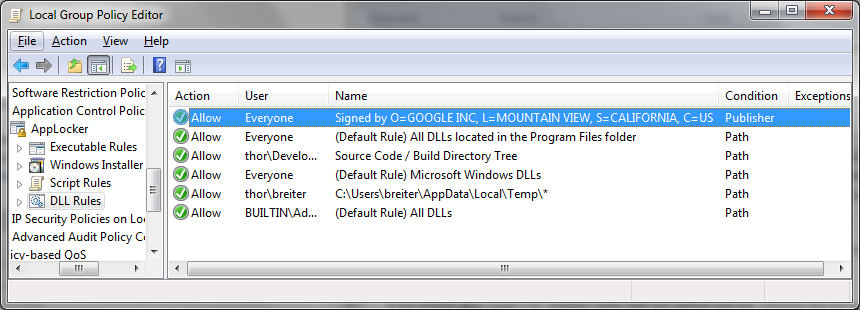
Because all of the code is installed in %ProgramFiles(x86)%, Chrome is fully compatible with the default AppLocker EXE and DLL rules even though the bundled Flash DLL is not signed. “Chrome Enterprise” runs fine with the default rule set and no special publisher rules at all.

Chrome MSI download here.

Policy templates here.

via Chromium Blog.

Zenburn Theme for EmEditor

I have used EmEditor as my text editor on Windows for several years. It is extremely fast and has some nice features like spell check, column select, a data-separated values columnar mode. It handles every text format imaginable. There are grammar files for syntax highlighting available for a huge number of languages.

It doesn’t come out-of-the-box with a dark color scheme that I really enjoy, so I have put together my favorite Zenburn color scheme.

emeditor

Zenburn.eetheme

[Zenburn]
MaxFind=3
Normal=#fcffe0,#3e3e3e,normal
Sel=#cddc8f,#2e4340,normal
CurrentLine=transparent,transparent,normal
Quoted=#008080,transparent,normal
Find=#f8f8f8,#228000,normal
URL=#7efcff,transparent,underline
Mail=#60db5d,transparent,underline
Tag=#808000,transparent,underline
SingleQuotes=#eb939a,transparent,normal
DoubleQuotes=#eb939a,transparent,normal
Comment=#7f9f7f,transparent,italic
Script=#a89100,transparent,normal
Braces=#ffb010,transparent,bold
InTag=#f0dfaf,transparent,normal
Highlight1=#ff80e1,transparent,bold
Highlight2=#c27e66,transparent,bold
Highlight3=#ffd7a7,transparent,bold
Highlight4=#9fc28a,transparent,bold
Highlight5=#afc4db,transparent,normal
Highlight6=#c6c4e6,transparent,normal
Highlight7=#f2dfa4,transparent,normal
Highlight8=#333333,#f18c96,normal
Highlight9=#242424,#d0d0a0,normal
Highlight10=#233323,#71d3b4,normal
Return=#0080ff,transparent,normal
Line=#c0c0c0,transparent,normal
PageBreak=#fcffe0,transparent,normal
LineNumber=#83a98a,#3e3e3e,normal
Ruler=#9fafaf,#3e3e3e,normal
Outside=#fcffe0,#3e3e3e,normal
CompareChange=#f8f8f8,#005baa,normal
CompareChar=#fcffe0,#800f00,normal
CompareAdded=#000000,#ffe0e0,normal
CompareDeleted=#000000,#e0f0ff,normal
CompareBlank=#000000,#e4e4e4,normal
Spell=transparent,transparent,wiggly
Unicode=transparent,#ff0000,normal
VerticalSel=#c0c0c0,transparent,normal
HexSel=#c0c0c0,transparent,normal
IndentGuides=#ff8040,transparent,dotted
HorzGrid=#0080ff,transparent,dotted
Outline=#8000ff,transparent,dotted
LineNumberLines=#000000,transparent,normal
RulerLines=#000000,transparent,normal
Find-2=transparent,#40ff40,normal
Find-3=transparent,#40ff40,normal

Install Zenburn theme in EmEditor:

  • Save the above as a text file called zenburn.eetheme
  • Tools | Properties for All Configurations
  • select the “Display” tab
  • Push the “>” button to the right of the Theme select box
  • Choose Import…
  • Pick the zenburn.eetheme file
  • Enjoy.

Updated 01/13/2011 to fix find coloration.

Really Least-Privilege Development: AppLocker and Visual Studio

AppLocker is a software execution policy tool in Windows 7 Enterprise and Ultimate and Windows Server 2008 R2. An AppLocker policy can be used to shift Windows from a  model where execution of code is permitted by default to a model where execution is denied by default. AppLocker is aware of binary exe, DLL/OCX, the scripting engines that ship with Windows and Windows Installer packages. The default rule sets for these categories will only allow code that is installed into the system or program files directories to execute. Once AppLocker is turned on, execution of code is denied by default and an unprivileged user cannot add executable code to the system.

If untrusted users can’t execute new code, then how can Visual Studio possibly work without making developers admin?

Grant Execute on Source/Build Tree: Fail

I thought this would be super simple and that all I would have to do was create Executable, DLL and Script path rules to grant execute on my source tree. At first, it seemed to work and I was off and running. Then I tried to build a big complicated project and the build failed all of a sudden. This solution had post-build rules but so what? I had script enabled for the build tree.

Build Actions Fail

Procmon shows that the pre- and post-build events are implemented as temporary batch scripts in %TEMP%. They are named <cryptic-number>.exec.cmd.

procmon-postbuild

Unfortunately %TEMP% is not a usable macro in AppLocker. You have to either create a generic Script rule to allow all *.exec.cmd scripts to execute or create rules for each Visual Studio user like C:\Users\<username>\AppData\Local\Temp\*.exec.cmd. Either way, post-build actions will start to work.

Web Apps Crash with Yellow Screen of Death

Another issue is that running Web apps with the built-in Visual Studio Development Web Server (aka Cassini) fails miserably. The obvious clue that this is AppLocker is “The program was blocked by group policy.”

webdev.webserver20-yellowdeath

The problem is that Cassini copies the DLLs and runs them from a subdirectory of %TEMP%\Temporary ASP.NET Files\.

webdev.webserver20-temp


In order for Cassini to work, you have to disable DLL rules or  create a DLL allow path rule for every developer in the form C:\Users\<username>\AppData\Local\Temp\Temporary ASP.NET Files\*.dll.

Visual Studio’s HelpLibAgent.exe Crashes

This one is a bit weirder and more surprising. Visual Studio 2010 has a new help system that operates as a local HTTP server. Invoking help with AppLocker DLL rules enabled generates a serious crash.

helplibagent-crash

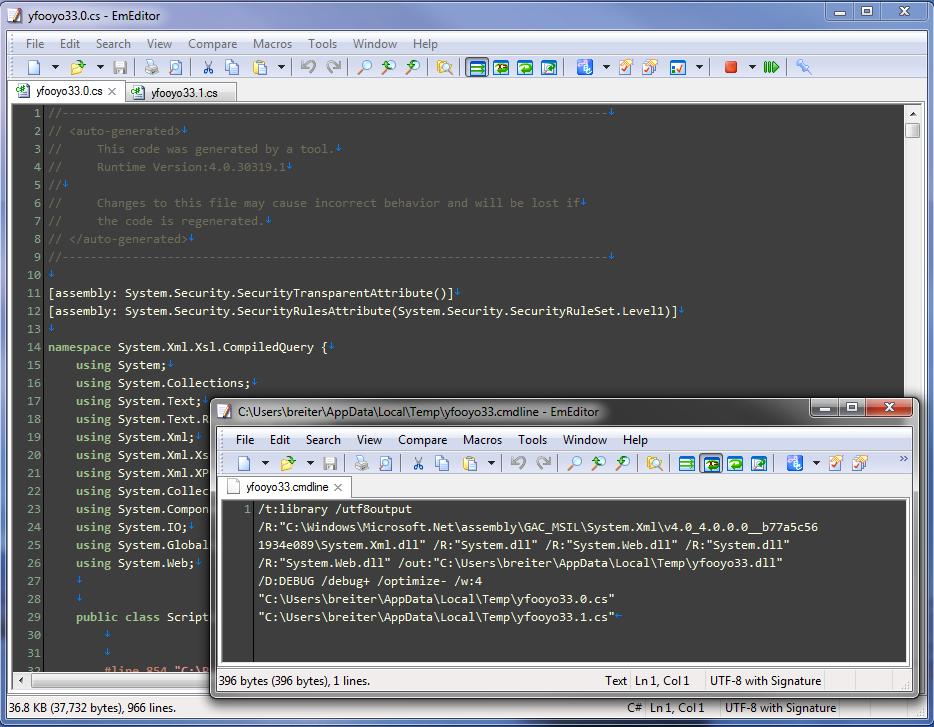
I’m not sure why it does this but HelpLibAgent.exe generates a random string and then two .cs files based on that string and invokes the C# compiler to generate a DLL based on the random string which is dynamically loaded by HelpLibAgent. This seems weird on the face of it that and there’s nothing in that code that looks like it has to be generated on a per-user basis at all. Weird, weird, weird.

helplibagent-dll-compile

In order for this to work you have to allow any randomly named dll to load out of %TEMP% which means disabling DLL rules or modifying the rule that was necessary for Cassini:

C:\Users\<username>\AppData\Local\Temp\*.dll.

Summary

In order to run Visual Studio with AppLocker a user needs the following rules:

  • DLL, EXE and Script: Allow path on source tree / build directory structure
  • Script: Allow path on %TEMP%\*.cmd.exec
  • DLL: Allow path on %TEMP%\*.dll
  • Unfortunately %TEMP% is not available in AppLocker so a C:\Users\<username>\AppData\Local\Temp\* for every <username> needed has to exist. These are probably best implemented as local policies.
  • Optional: Allow script *.ps1. (This is pretty safe because PowerShell has its own tight script execution security model.)
  • It’s unfortunate that DLL rules have to be enabled for a well-known location like %TEMP% but that still doesn’t make the DLL rule useless.

    • OCX is still not permitted from %TEMP%
    • AppLocker DLL rules are complementary to CWDIllegalInDllSearch for mitigating DLL Hijacking because it provides a more granular options. This is particularly important if you need to use a global CWDIllegalInDllSearch setting of 1 or 2 for compatibility reasons.
    Once these rules are in place, the experience is seamless. The rules don’t get in the way of anything.
    Note that AppLocker script rules only apply to the scripting hosts that ship with Windows: CMD, Windows Scripting Host (.vbs and .js) and PowerShell). Perl, Python, Ruby, etc interpreters are not affected by AppLocker policy. Similarly, execution of Java jar files are not affected by AppLocker.
    It would be nice if DLL rules were a little smarter. For instance, I would like to be able to allow managed DLLs on some path but not native code.

WorkAround: Console2 + Telnet.exe on Windows 7 Crashes ConHost.exe

conshost-croak

Entering the Windows telnet.exe prompt mode causes the shell process underneath Console2 to crash on Windows 7. You can reproduce this by just invoking telnet with no arguments in a Console2 session. An alternate route to hit this is exiting a telnet session with CTRL+].

The symptom is Console2 freezing because it is no longer getting text from its slaved native console followed up with a crash dialog for conhost.exe and whetever your shell was.

Unhandled exception at 0xffdd1df9 in conhost.exe: 0xC0000005: Access violation reading location 0x0000000003385460.>    conhost.exe!SB_StreamWriteToScreenBuffer()  + 0x61 bytes   

A workaround is to launch telnet into a separate conhost.exe window.

#force telnet.exe to start in its own console window. 
function telnet { start $env:SystemRoot\System32\telnet.exe $args }

Or use putty –P port –telnet host as an alternative to telnet.exe. (I can’t get plink.exe to be interactive with telnet for me.)

Update

Unless you need something nifty that telnet.exe is doing, a more elegant solution is to Lee Holmes’ Connect-Computer.ps1 PowerShell script as a telnet replacement.

Headbang: Chrome, Flash and AppLocker Don’t Play Together

Google Chrome has bundled  a private copy of Flash since 5.0.375.86. Flash is packaged as gcswf32.dll in the Chrome application folder. All of the EXE and DLL files that come with Chrome as cryptographically signed by Google except for gcswf32.dll which is not signed at all. However, the NSAPI compatible Flash plugin distributed by Adobe is signed by Adobe.

This matters if you are using AppLocker DLL rules to define execution rules because there is no good way to create a permit rule for this DLL. AppLocker is a component of Windows 7 Enterprise and Ultimate SKUs which provides a straightforward mechanism for configuring Windows with a usable default-deny execution policy.

If you enable AppLocker EXE and DLL rules with the default rule set, Chrome will not run at all because Chrome is installed into the %userprofile%\AppData\AppData\Google\Chrome directory structure which is writable by unprivileged users. The obvious solution is to create EXE and DLL rules to permit code published by Google to execute. This works great, except that Flash will not execute. Why oh why is gcswf32.dll not signed by either Google or Adobe? There’s no way to whitelist this DLL except creating a permit *\gcswf32.dll rule or giving up on DLL rules altogether.

Workaround

A viable workaround is to use about:plugins to disable the Flash plugin Google distributes and globally install the “Flash player for Firefox, Mozilla, Netscape, Opera (and other plugin-based browsers)”. This plugin gets installed into C:\Windows\SysWOW64\Macromed\Flash on x64 or C:\Windows\system32\Macromed\Flash on x86 (and is signed by Adobe) is whitelisted by the default DLL rule set because it is inside of the Windows directory.

applocker-exeapplocker-dlldisable-chrome-bundled-flash

Chrome Team, Please Fix Me

You have to disable the bundled Flash player bundled by Chrome in order for Flash to work under this scenario, which means this is a workaround that is not enterprise ready unless your company is full of nerds. Also, this means that I have to worry about updating Flash instead of Chrome just handling it.

AppLocker is good stuff. Chrome is good stuff. I’d these technologies to play better together.

All Google needs to do is distribute a signed version of the Flash player plugin. Why aren’t they already doing this, anyway?

Please Chrome team, this is trivial to fix. Thanks in advance.

Reported as issue 65322.

Edit

A reasonable solution is to use the Chrome enterprise MSI installer which installs Chrome into the standard “program files'” location which means the default AppLocker permit rule on “program files” covers Chrome.

Update

I’m not sure when Google started distributing signed versions of Flash but in Chrome 12, gcswf32.dll comes with a valid signature from Adobe.

Annoyance: Android Market Regional App Availability

The Android Market Place has regional app availability which means that if you live or travel outside of North America and the EU, you don’t have access to some of the best apps like Google Voice, Google Listen, GMail App updates, Amazon Kindle App and Skype to name a few.

It turns out that the regional restriction is by carrier but Google isn’t looking at where your data is coming from. They are looking at the carrier identifier on the SIM. The restrictions aren’t technically regional, they are by carrier.

If I put my AT&T SIM in my phone in Accra, I see the USA-only apps and can download them over WiFi. Unfortunately, even once they are installed apps that I have to install using my AT&T SIM don’t seem receive updates when I am using my Zain SIM. It seems that I have to periodically switch SIMs and check for updates.

It’s possible to spoof the carrier id and fool the Android Market  if you root your phone but I really don’t want to spend that kind of time and energy beating on my phone. I’d like it to just work, please.

The user experience for this is really bad. It feels like a bug with the phone because Android Market just says that the software was not found when you follow a link or QR code for a restricted app. Couldn’t it at least say something like “We’re sorry. The publisher of this software has not made it available for your carrier. Click here to request it to be made available.” This is the Amazon approach when a book is not available for Kindle. At least that is mildly cathartic that you get to complain to someone.

Is this carrier whitelisting of apps really necessary for the Android Market? Really?

What’s new in Boot Camp 3.2?

Bootcamp IconBoot Camp 3.2 is out. It is not a cumulative update. You have to install Boot Camp 3.0 from Snow Leopard, then apply 3.1 and then apply 3.2. Apple says that it “adds support for the ATI-Radeon HD 5870 graphics card, Apple USB Ethernet Adapter, MacBook Air SuperDrive, and addresses critical bug fixes.”

Apple doesn’t describe what the critical bug fixes are, but here’s what else is new in there.

  • New Apple mutlitouch touchpad drivers: 3.1.0.10 (replaces 3.0.0.0)
  • New Cirrus Audio drivers: 6.6006.1.26 (replaces previous patch 6.6001.1.25 from BC 3.1.3 or  6.60001.1.21 from BC 3.1).
  • New Apple wireless touchpad drivers: 3.1.0.7
  • New Boot Camp manager (bootcamp.exe): 3.1.0.10 (replaces 3.0.0.1)
  • New Boot Camp control panel AppleControlPanel.exe: 3.2.0.0 (replaces 3.0.0.2)
  • New Apple OS Manager: 3.1.0.3 (replaces 3.1.0.1)
  • New HFS+ driver, AppleHFS.sys: 3.2.0.0 (replaces 3.1.0.0)
  • New apple mount manager, AppleMNT.sys: 3.2.0.0 (replaces 3.0.0.1.8)
    The most immediate thing that I noticed is that FN+F5 on my MacBook Pro (MacBookPro5,3) can now dial the keyboard backlight all the way down to off. The built-in speaker volume also seems to be much louder without any enhancements enabled.

Maybe with Boot Camp 3.0 (Lion?) we’ll get an ambient light sensor driver so that the Adaptive Brightness service in Windows 7 can work.

Embedding Arbitrary Language Glyphs in PDF with ItextSharp

One of my clients has an application which generates a PDF using ITextSharp. The document largely contains English text in the Latin character set but a portion of the PDF is supposed to contain contact information in a foreign language. In the first version of the software, the requirement was to support Latin, Cyrillic, Georgian and Armenian character sets.

We quickly discovered during testing that the Adobe Type 1 fonts embedded in itextsharp.dll only support Latin characters. Code points from the Cyrillic, Georgian and Armenian character sets showed up as white space in the document. Fortunately, iTextSharp supports TrueType font embedding with the correct incantation which enabled us to use Sylfaen to provide the necessary glyphs.

string sylfaenpath = Environment.GetEnvironmentVariable( "SystemRoot" ) + "\\fonts\\sylfaen.ttf";
BaseFont sylfaen = BaseFont.CreateFont( sylfaenpath, BaseFont.IDENTITY_H, BaseFont.EMBEDDED );
Font easternEuroTextFont = new Font( sylfaen, 9f, Font.NORMAL );

With the second version of the application, we needed to support a bunch of new character sets in addition to the ones we previously supported including Hebrew, Arabic, Devangari, Sinhala, Lao, Thai and more South Asian and Southeast Asian scripts.

One option is to pick supporting fonts for each character set but we elected to pick something universal, which is Arial Unicode which includes glyphs for every code point defined in Unicode 2.1. Arial Unicode is from the Afra Monotype foundry and is bundled with Office 2007 and later but can be purchased separately if Office isn’t installed. (The main side effect of this font choice is moving from a serif font to a sans serif one.)

Universal Glyph Support Can Still Yield Gibberish

The remaining wrinkle is that Hebrew and Arabic are right-to-left languages which means that the characters in a Hebrew or Arabic string are supposed to be rendered from right-to-left instead of left-to-right. Just rendering an Arabic string with Arial Unicode in iTextSharp will yield reflected output which is gibberish.

Here is some reference Arabic text rendered in Arial. It says “al-ingliziya”, the Arabic word for English.

al-ingliziyah

Here’s what you get by default using Arial Unicode in iTextSharp.

default-broken-al-ingliziyah

Clearly, this is different from the reference rendering. Arabic is complicated because of the way the ligatures work so that the shape of a letter is heavily influenced by the letters next to it but basically, it’s backwards. What we have is now not nothing but Hebrew and Arabic are gibberish instead. We need to alter the rendering for Hebrew and Arabic and make them right-to-left.

A simple algorithm is to detect the presence of Hebrew or Arabic code points in a string and turn on right-to-left rendering. Regular Expressions define \p{Hebrew} and \p{Arabic} character classes which would be useful but unfortunately those aren’t supported in System.Text.RegularExpressions at this point. We need to roll our own.

const string regex_match_arabic_hebrew = @"[\u0600-\u06FF,\u0590-\u05FF]+";
if( Regex.IsMatch( text, regex_match_arabic_hebrew, RegexOptions.IgnoreCase ) 
    //arabic or hebrew characters exist, fix rendering

There’s no obvious RTL option for a text element in iTextSharp, so I tried reversing the strings, which is a slight improvement but it’s still broken. What we have is brain-dead rendering. The ligatures are not connecting the letters correctly.

string-reverse-broken-al-ingliziyah

On closer examination, there is RTL support in iTextSharp. It is exposed through object graph elements that implement IPdfRunDirection. (This is one of the places where it really shows that iTextSharp is a Java port. The use of static integer constants rather than enums is very Java 1.4. Enums are much more discoverable and the correct usage is more intuitively obvious.)

element.RunDirection = PdfWriter.RUN_DIRECTION_RTL;

Now the output from iTextSharp looks like the reference rendering.

correct-rtl-al-ingliziyah

Transliterate to Java and the same concepts apply to iText.

Example Snippet Code in C#

using System;
using System.Collections.Generic;
using System.IO;
using System.Text.RegularExpressions;
using iTextSharp.text;
using iTextSharp.text.pdf;

//... assume a class that does stuff exists

pubilc byte[] CreatePdfStreamPdfWithRandomLanguageSupport( IEnumerable<string> textList )
{
	//C# does not support \p{Arabic} and \p{Hebrew} character classes. We have to roll our own.
	//We are assuming any string that contains an Arabic or Hebrew character is meant to be RTL.
	//Better would be to break strings into word tokens and test each word.
	const string regex_match_arabic_hebrew = @"[\u0600-\u06FF,\u0590-\u05FF]+";
	const string arialunicodepath          = Environment.GetEnvironmentVariable( "SystemRoot" ) + "\\fonts\\ARIALUNI.TTF";

	Document document = new Document( PageSize.LETTER );
	using(MemoryStream stream = new MemoryStream())
	{
		PdfWriter writer = PdfWriter.GetInstance( document, stream );
		try
		{
			//bunch of document setup here.
			document.Open();
			//arbitrarily, creating a 5 columnt table.
			PdfPTable table = new PdfPTable( 5 );
			
			//embed a Unicode font with broad glyph support for any code point we might need.
			//only the glyphs for code points actually used will be embedded in the document
			BaseFont nationalBase;
			if( File.Exists( arialunicaodepath ) 
				BaseFont.CreateFont( arialunicodepath, BaseFont.IDENTITY_H, BaseFont.EMBEDDED ); 
			else
				throw new FileNotFoundException( "Could not find \"Arial Unicode MS\" font installed on this system." );

			Font nationalTextFont = new Font( nationalBase, 9f, Font.NORMAL );

			foreach( string text in textList )
			{
				//PdfPCell implements IPdfRunDirection
				PdPCell cell = new PdfPCell();
				//Arabic and Hebrew strings need to be reversed for right-to-left rendering
				//which is done by setting IPdfRunDirection.RunDirection. Otherwise, your RTL language text
				//comes out as backwards gibberish.
				if( text != null && Regex.IsMatch( text, regex_match_arabic_hebrew, RegexOptions.IgnoreCase ) )
			   		cell.RunDirection = PdfWriter.RUN_DIRECTION_RTL;
			    //apply unicode font
			    Phrase phrase = new Phrase( text, nationalTextFont );
				cell.Add( phrase );
				table.AddCell( cell );
			}
			document.add( table );
		}
		finally
	    {
	        document.Close();
	        writer.Close();
	    }
	    return stream.GetBuffer();
	}
}

FIX: VirtualBox Host-Only Network Adapter Creates a Virtual “Public Network” Connection That Causes Windows to Disable Services

vbox-host-only-net-net-n-sharing

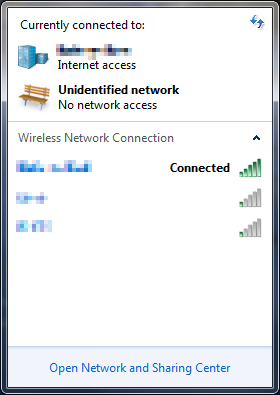
vbox-host-only-net-connectletVirtualBox creates a “VirtualBox Host-Only Network” device which is essentially a loopback adapter for creating network connections between virtual machines and between the host and virutal machines. Unfortunately, it shows up to Windows as an unidentified public network. Connecting to a “public network” ratchets up your firewall and disables network discovery and SMB/CIFS network shares. This is kind of a big side effect of installing some VM software.Fortunately, Windows does have a way to mark a network device as virtual by creating a registry value.

The type of the device. The default value is zero, which indicates a standard networking device that connects to a network. Set *NdisDeviceType to NDIS_DEVICE_TYPE_ENDPOINT (1) if this device is an endpoint device and is not a true network interface that connects to a network. For example, you must specify NDIS_DEVICE_TYPE_ENDPOINT for devices such as smart phones that use a networking infrastructure to communicate to the local computer system but do not provide connectivity to an external network.

This powerhsell script will find the “VirtualBox Host-Only Ethernet Adapter device entry in the registry and adds the ‘*NdisDeviceType’ value of 1. After reboot, the “VirtualBox Host-Only Ethernet Adapter” will no longer be monitored by the Network and Sharing center.

# tell windows that VirtualBox Host-Only Network Adapter
# is not a true network interface that connects to a network
# see http://msdn.microsoft.com/en-us/library/ff557037(VS.85).aspx
pushd
echo 'Marking VirtualBox Host-Only Network Adapter as a virtual device.'
cd 'HKLM:\system\CurrentControlSet\control\class\{4D36E972-E325-11CE-BFC1-08002BE10318}'
ls ???? | where { ($_ | get-itemproperty -name driverdesc).driverdesc `
-eq 'VirtualBox Host-Only Ethernet Adapter' } |`
new-itemproperty -name '*NdisDeviceType' -PropertyType dword -value 1
echo 'After you reboot the VirtualBox Host-Only Network unidentified public network should be gone.'
popd


ASP.NET MVC 2.0 Undocumented Model String Property Binding Breaking Change

The default behavior of Model binding in ASP.NET MVC 1.0 was to initialize strings to string.Empty. However, MVC 2.0 defaults to initializing strings to null. Unfortunately, this is not listed as one of the breaking changes from MVC 1.0.

This can be a big problem if you have a substantial site built in MVC 1.0 and you import it into Visual Studio 2010 and use MVC 2.0. You may find that you are suddenly throwing NullReferenceException during model binding on code that is working in production.

Locating the Issue

ASP.NET MVC source code is available under the Ms-PL open source license which means that it is possible to diff the two versions of MVC and figure out what changed without having to guess or disassemble anything.

DefaultModelBinder-diff

protected virtual object GetPropertyValue(ControllerContext controllerContext, ModelBindingContext bindingContext, PropertyDescriptor propertyDescriptor, IModelBinder propertyBinder) {
    object value = propertyBinder.BindModel(controllerContext, bindingContext);

    if (bindingContext.ModelMetadata.ConvertEmptyStringToNull && Object.Equals(value, String.Empty)) {
        return null;
    }

    return value;
}

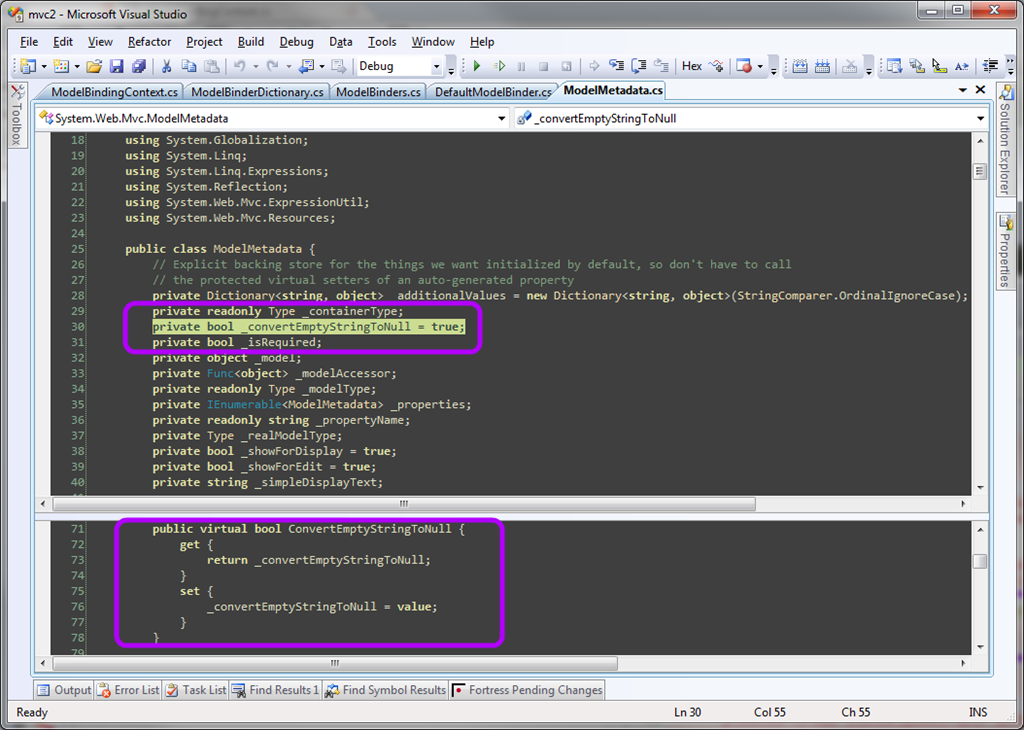
MVC 2.0 adds some indirection to the binding behavior of the DefaultModelBinder class via a new ModelMetadata class which governs some of the behavior of DefaultModelBinder. Of particular interest here is that there is a property named ConvertEmptyStringToNull which, when true, causes an empty string to be returned as null instead.

It also turns out that when ModelMetaData is constructed, the value of ConvertEmptyStringToNull is set to true and there is no code in MVC which changes that default value.

ModelMetaData.ConvertEmptyString-default

Restoring MVC 1.0 Model String Property Binding Behavior

I think the quickest solution is going to be to set that ConvertEmptyStringToNull property to false by providing a creating a new, custom default implementation of IModelBinder by inheriting from DefaultModelBinder and changing the ConvertEmptyStringToNull value to false on the internal ModelMetaData object.

public sealed class EmptyStringModelBinder : DefaultModelBinder 
{
    public override object BindModel(ControllerContext controllerContext, ModelBindingContext bindingContext)
    {
        bindingContext.ModelMetadata.ConvertEmptyStringToNull = false;
        return base.BindModel(controllerContext, bindingContext);
    }
}

Then the Application_Start() method of Global.asax.cs, we set the DefaultBinder property of ModelBinderDictionary to use our custom type instead of leaving it as the default. This is exposed through the Binders property on the static ModelBinders class so that we get our IModelBinder as the default instead of DefaultModelBinder.

protected void Application_Start()
{
	ModelBinders.Binders.DefaultBinder = new EmptyStringModelBinder();
	RegisterRoutes( RouteTable.Routes );
}