VirtualBox Seemless Mode Glitch with Ubuntu

I recently installed Ubuntu 10.04 Lucid Lynx in VirtualBox. I applied all updates and installed the VM additions. When I tried swtiching into seemless mode, I ran into a problem where all of the window chrome disappeared. Well, the title bars were gone as well as a little bit of the status bar that includes the rounded corners. The title bars were still there but still, I was unable to move or resize windows in seamless mode, which is not ideal.

vbox-seemless-bug

Seemless Mode Only Works Correctly with all Effects Disabled

After fiddling for a while, I realized that Ubuntu had turned on some window effects after rebooting with the VM additions installed. Disabling all window effects solves the problem.

ubuntu-disable-effects

Seamless mode is cool but it isn’t multi-monitor aware. I can’t drag guest OS windows off of the monitor where seamless mode was initiated. If I define the VM as having 2 monitors in VirtualBox, Ubuntu doesn’t see the second one. Also, the screens size is set to the resolution of my smaller monitor in seamless mode which causes the Ubuntu desktop toolbars to float in the middle of my screen. Basically, the entire guest OS desktop has to be on one of my monitors but I can move everything with {right-CTRL+L} (to exit seamless mode), move guest OS window to desired monitor, {right-CTRL+L} (to enter seamless mode on the new monitor). This solution is workable, but hopefully some day VirtualBox seamless mode will automagically present multiple monitors to the guest OS and let me drag windows around arbitrarily.

VirtualBox Trigger Windows 7 Bug Causing it to Believe the File System is Broken

Booting for 4 hours and another hour to go

IMG_20100913_173926

VirtualBox 3.2.8 (and possibly other versions) running on Windows 7 or Windows Server 2008 R2 as the host operating sytsem triggers a bug that causes Windows 7 or Windows Server 2008 R2 to believe that NTFS is corrupt. Chkdsk then runs on every boot. In fact chkdsk is chasing a ghost. There is no corruption but on my system chkdsk takes over 5 hours to run to completion.

I don’t believe that VirtualBox is doing anything hinky. It is just unlucky to trigger a regression in NTFS.

This is a known regression in Windows 7 in the NTFS file system.  It occurs when doing a superceding [sic] rename over a file that has an atomic oplock on it (atomic oplocks are a new feature in Windows 7).  The indexer uses atomic oplocks which is why it helped when you disabled the indexer.  Explorer also uses atomic oplocks which is why you are still seeing the issue.  When this occurs STATUS_FILE_CORRUPT is incorrectly returned and the volume is marked "dirty" which is a signal to the system that chkdsk needs to be run.  No actual corruption has occured [sic].

Neal Christiansen
NTFS Development Lead

Fortunately, a hotfix already exists. Applying KB982927 appears to fix the issue for me.

Achieve Radically Better Firewire 800 Performance on Windows 7/2008/Vista x64

Microsoft is clearly ambivalent about Firewire (IEEE 1394). Windows 7 introduced a new IEEE 1394 stack but the performance remains abysmal compared to a Mac.

I have a Drobo 2nd generation device. My choice is to use slow USB 2 or a fast Firewire 800 interface. Unfortunately, large file copies over Firewire on Windows 7 or Windows Server 2008 R2 are slower than USB2. Worse, they can lock up the target device so that nothing else can access it until the file copy succeeds. I don’t have an explanation for why native Firewire support remains so lame but fortunately there is a free-of-charge solution to turbo-charge Windows Firewire performance to Mac OS X levels.

If you have a Firewire interface on your Windows 7 computer, do not hack around with legacy drivers and do not turn off the Windows write-cache buffer. Instead, download the latest ubiCore Firewire drivers for your version of Windows and install them. (Requires disconnecting all your Firewire devices and a reboot.)

Enjoy the painless 800 Mbps file copies.

Highly recommended.

Copy and Paste with Clipboard from PowerShell

Many times I want to use PowerShell to manipulate some text that I have in something else like email or a text editor or some such or conversely, I do something at the command line and I want to paste the output into a document of some kind.

I’m not sure why there is no cmdlet for outputting to clipboard.

PS> get-command out-*

CommandType     Name             Definition                                         
-----------     ----             ----------                                         
Cmdlet          Out-Default      Out-Default [-InputObject <PSObject>] [-Verbose]...
Cmdlet          Out-File         Out-File [-FilePath] <String> [[-Encoding] <Stri...
Cmdlet          Out-GridView     Out-GridView [-InputObject <PSObject>] [-Title <...
Cmdlet          Out-Host         Out-Host [-Paging] [-InputObject <PSObject>] [-V...
Cmdlet          Out-Null         Out-Null [-InputObject <PSObject>] [-Verbose] [-...
Cmdlet          Out-Printer      Out-Printer [[-Name] <String>] [-InputObject <PS...
Cmdlet          Out-String       Out-String [-Stream] [-Width <Int32>] [-InputObj...

Fortunately, though Windows ships with a native clip.exe for piping text to clipboard. You can alias it to out-clipboard or just pipe to “clip”.

new-alias  Out-Clipboard $env:SystemRoot\system32\clip.exe

Now you can just pipe to Out-Clipboard or clip just like the other Out-* cmdlets.

The larger issue is that PowerShell doesn’t expose a way to paste text from the clipboard. However, the WinForms API of the .NET Framework has a GetText() static method on the System.Windows.Forms.Clipboard class. There is a catch, though:

The Clipboard class can only be used in threads set to single thread apartment (STA) mode. To use this class, ensure that your Main method is marked with the STAThreadAttribute attribute.

This is unfortunate because PowerShell runs in a multithreaded apartment by default which means that the workaround is to spin up a new PowerShell process which is slow.

function Get-ClipboardText()
{
	$command =
	{
	    add-type -an system.windows.forms
	    [System.Windows.Forms.Clipboard]::GetText()
	}
	powershell -sta -noprofile -command $command
}

A slightly less obvious approach is to paste the text from the clipboard into a non-visual instance of the System.Windows.Forms.Textbox control and then emit the text of the control to the console. This works fine in a standard PowerShell process and is substantially faster than spinning up a new process.

function Get-ClipboardText()
{
	Add-Type -AssemblyName System.Windows.Forms
	$tb = New-Object System.Windows.Forms.TextBox
	$tb.Multiline = $true
	$tb.Paste()
	$tb.Text
}

The TextBox method is about 500 times faster than the sub-process method. On my system, it takes 0.501 seconds to do spin up the sub-process and emit the text from the clipboard versus 0.001 seconds to use the TextBox control in the current process.

I also alias this function to “paste”. The commands I actually type and remember are “clip” and “paste”.

When using paste, I generally am setting a variable or inserting my pasted text into a pipeline within parens.

CAVEAT: Whenever you capture a value without any {CR}{LF}, the clipboard will add it. You may need to trim the newline to get the behavior you expect when pasting into a pipeline.

Here’s some one-liners to illustrate. I have dig from BIND in my path and I have Select-String aliased to grep. Notice how when I paste the IP address I captured to the clipboard from the one-liner gets pasted back with an extra blank line.

PS> ((dig google.com) | grep '^google\.com') -match '(\d+\.\d+\.\d+\.\d+)$' | out-null; $matches[0]
72.14.235.104
PS> ((dig google.com) | grep '^google\.com') -match '(\d+\.\d+\.\d+\.\d+)$' | out-null; $matches[0] | clip
PS> paste
72.14.235.104

PS> ping (paste)
Ping request could not find host 72.14.235.104
. Please check the name and try again.
PS> ping (paste).trim()

Pinging 72.14.235.104 with 32 bytes of data:
Reply from 72.14.235.104: bytes=32 time=192ms TTL=51
Reply from 72.14.235.104: bytes=32 time=208ms TTL=51
Reply from 72.14.235.104: bytes=32 time=212ms TTL=51
Reply from 72.14.235.104: bytes=32 time=210ms TTL=51

Ping statistics for 72.14.235.104:
    Packets: Sent = 4, Received = 4, Lost = 0 (0% loss),
Approximate round trip times in milli-seconds:
    Minimum = 192ms, Maximum = 212ms, Average = 205ms

More Granular Options for CWDIllegalInDllSearch Needed

I’m starting to see a class of issues where plugins rely on their libraries loading from the current working directory (CWD). To me this implies that the 0xffffffff option to completely disable loading from the CWD is not viable for most people in the near term but the 2 option of disabling network locations leaves open luring attacks based on removable storage like USB thumb drives or an attack that relies on an evil DLL that an attacker manages to place in an unprotected directory in the user’s profile somewhere.

I would like to see additional options to CWDIllegalInDllSearch. We need something between blocking loading of DLLs from CWD when CWD is a network location and blocking all loading from CWD at all. I want to be able to allow loading from CWD if CWD is a trusted location on my local computer in order to maintain compatibility with existing software that relies on this behavior but disable loading from CWD from any untrusted location.

A trusted location would be something that requires Administrator privilege to write into. That means the system folders and the “Program Files” folders.

I hope that Microsoft will realize the need for additional granularity and add some more options to CWDIllegalInDllSearch. The following would cover all the bases, I think:

  • 1 = disable CWD in LoadLibrary() search for WebDAV
  • 2 = disable CWD in LoadlLibrary() search for all networked location
  • 3 = option 2 and disable CWD in LoadLibrary() search for removable storage locations
  • 4 = disable CWD in LoadLibrary() anywhere except for “Program Files”
  • 0xffffffff = disable CWD in LoadLibrary() search
    WARNING: Note that options 3 and 4 are hypothetical. Setting CWDIllegalInDllSearch to 3 or 4 is currently equivalent to setting CWDIllegalInDllSearch to 0 and will enable the very insecure DLL loading behavior we are trying to eliminate.

My hypothetical CWDIllegalInDllSearch = 4 should provide equivalent security to CWDIllegalInDllSearch = 0xffffffff because anything in Program Files is trusted by definition. But it provides a backwards compatibility cushion for applications that require loading libraries from CWD.

There are two classes of applications that I can imagine which have a legitimate reason to load DLLs outside of Program Files and system.

  • Some kind of run-from-network corporate app
  • The latest generation of apps designed to run with least-privilege that install themselves into the current user’s profile or the all user’s profile like Chrome and WebEx but I’m not worried about these apps.

My feeling is that the corporate system administrators can handle provisioning rules such that their apps can run or virtualize them and the new apps that are installing themselves into unorthodox locations can fend for themselves. I think there is real utility in a CWD is OK in “Program Files” only mode and I hope that Microsoft will release an update to KB2264107 to give it to us.

Mozilla Compatible Silverlight 4 Plugin Requires Loading DLLs from CWD

chrome-silverlight-agcore-missingI visited a site yesterday in Chrome that tried to load Silverlight to provide a video player. I have KB2264107 installed and have globally disabled loading of DLLs from the current working directory in order to mitigate luring attacks against apps that use the default insecure DLL loading behavior of LoadLibrary(). Just like the Java plugin for Mozilla, Chrome generated a big fat bonk dialog trying to load the DLLs that the Silverlight plugin uses. The specific missing file is agcore.dll, which is found in “C:\Program Files (x86)\Microsoft Silverlight\4.0.50524.0” on my system.

I tried creating a symlink to agcore,dll so that agcore.dll is in the same directory as Chrome.exe, which fixes the bonk but Silverlight doesn’t work. I just end up with a black box where the movie player should be. I also tried adding the Silverlight directory to $env:path which removed the bonk but, instead, I got the “Install Microsoft Silverlight” button. I tried various combinations of symlinking DLLs and messing with the $env:path but I didn’t arrive at a combination that can actually work.

The only solution that I found is to dial the CWDIllegalInDllSearch value for Chrome and Firefox to 2 (DLLs not allowed to load from CWD if CWD is any remote, network location) instead of 0xffffffff (it also works to change this globally). I then have to hope that Firefox and Chrome are careful about how they are using CWD. I hope they are setting CWD just for loading the installed plugins in “Prgram Files” but cannot be lured into loading some evil DLL from a spurious location when doing something like opening an HTML document on a USB stick.


PS> Get-ItemProperty chrome.exe, firefox.exe | select pspath,cwdillegalindllsearch | fl


PSPath                : Microsoft.PowerShell.Core\Registry::HKEY_LOCAL_MACHINE\SOFTWARE\Microsoft\Windows NT\CurrentVer
                        sion\Image File Execution Options\chrome.exe
CWDIllegalInDllSearch : 2

PSPath                : Microsoft.PowerShell.Core\Registry::HKEY_LOCAL_MACHINE\SOFTWARE\Microsoft\Windows NT\CurrentVer
                        sion\Image File Execution Options\firefox.exe
CWDIllegalInDllSearch : 2


Java Built with Unsupported Old Compilers

When I turned off DLL loading from the current working directory to defeat DLL pre-loading luring attacks, one of the things I discovered was that the Java plug-in was broken in Firefox and Chrome. This problem of Java finding its C library is not new at all. The tubes are choked with posts and bug reports about getting various things that are dependent on Java to work when msvcr71.dll can’t be found. The new CWDIllegalInDllSearch = 0xFFFFFFFF option just exacerbates an existing deployment problem.

PS> cd 'C:\Program Files (x86)\Java\jre6\bin\new_plugin'
PS> dumpbin /dependents .\npjp2.dll
Microsoft (R) COFF/PE Dumper Version 10.00.30319.01
Copyright (C) Microsoft Corporation.  All rights reserved.


Dump of file .\npjp2.dll

File Type: DLL

  Image has the following dependencies:

    USER32.dll
    GDI32.dll
    ADVAPI32.dll
    MSVCR71.dll
    KERNEL32.dll
    ole32.dll

  Summary

        6000 .data
        3000 .rdata
        1000 .reloc
        7000 .rsrc
        4000 .text

The root of the Mozilla-compatible browser Java plugin problem is npj2.dll which is dynamically linked to msvcr71.dll. Because it is a plugin, the DLL loading is done by Windows on behalf of the executable and  (Chrome or Firefox) rather than the plugin. The new_plugin directory includes msvcr71.dll which probably helped if a browser changed its CWD to the new_plugin directory when loading npj2.dll but with searching CWD out of the picture it doesn’t.

Java simply doesn’t do a good job of loading its C runtime correctly on Windows. It’s not a new problem. I don’t understand why don’t just change a switch on the complier to /MT instead of /MD and statically link the C runtime into jpjp2.dll. That would make the whole problem go away.

There are also some other oddities here. There are 2 different C runtimes used in the 32-bit version of Java 6 for Windows. For some reason they are redistributing msvcr71.dll (C runtime from Visual Studio .NET 2003) and also msvcrt.dll which is supposed to be the name of the private C runtime used by Windows components. However, the msvcrt.dll in the Java directory is actually the C runtime from Visual Studio 6 or possibly a very old Platform SDK.

By implication Oracle/Sun is using the C/C++ optimizing compiler from Visual Studio 6 (1998) and Visual Studio .NET 2003 to build the 32-bit version of Java. Holy cow those are 5 and 3 versions back from the current compilers and between 12 and 7 years old. I’m pretty sure that Visual Studio 6 is no longer supported and unfortunately both predate the side-by-side C runtime distribution system that starts with Visual Studio 2005.

The x64 version of Java is even stranger. It links against a Microsoft  x64 C runtime library called msvcrt.dll. Again this is the name reserved for the private Windows platform C runtime but this msvcrt.dll has file version 6.10.2207.0 either from a very old version of the Windows Platform SDK that provided x64 compilation support prior to Visual Studio 2005 or from a tool chain that was available by request (and is no longer available) for Visual Studio 2003.

It seems like the Java team has made a bit of a fetish of using really old compilers for the Microsoft platforms. I can understand that there is a risk of breaking stuff when upgrading a tool chain but this has been taken a bit to the extreme by the Java build team. There is a cost to testing a huge platform like Java when building with a new tool chain. Sun was cash-constrained and, although popular, Java SE didn’t really make them any money directly.

Good News for Java 7 (Probably)

It looks like the problem is being addressed. OpenJDK 7 builds, it looks like Oracle is upgrading to the C/C++ compiler from Visual Studio 2010.

BEGIN WARNING: At this time (Spring/Summer 2010) JDK 7 is starting a transition to use the newest VS2010 Microsoft compilers. These build instructions are updated to show where we are going. We have a QA process to go through before official builds actually use VS2010. So for now, official builds are still using VS2003. No other compilers are known to build the entire JDK, including non-open portions. So for now you should be able to build with either VS2003 or VS2010. We do not guarantee that VS2008 will work, although there is sufficient makefile support to make at least basic JDK builds plausible. Visual Studio 2010 Express compilers are now able to build all the open source repositories, but this is 32 bit only. To build 64 bit Windows binaries use the the 7.1 Windows SDK.END WARNING.

The 32-bit OpenJDK Windows build requires Microsoft Visual Studio C++ 2010 (VS2010) Professional Edition or Express compiler. The compiler and other tools are expected to reside in the location defined by the variable VS100COMNTOOLS which is set by the Microsoft Visual Studio installer.

So maybe in 2011 Java will have its C runtime library sorted out by virtue of having a supported global mechanism to register the Visual Studio 2010 C runtime.

Java Browser Plugin for Mozilla Vulnerable to DLL Preloading Attack

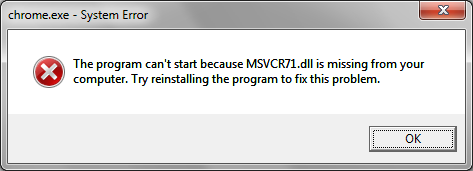
chrome-java-bonkThe “Next Generation Java Plug-in 1.6.0_21 for Mozilla browsers” 32-bit version for Windows uses CWD to load its C runtime library (msvcr71.dll). If you have globally disabled loading libraries from the current working directory (CWD) by globally setting CWDIllegalInDllSearch to 0xfffffff, you will get a bonk like the one shown at the right. Firefox also fails to load the JVM but it doesn’t give any feedback about why it isn’t working.

Note that this is not a general problem with Java. Java desktop applications like Eclipse work and the Java ActiveX plugin for IE works. The problem is specific to the NSAPI plugin and this indicates that the Java plugin for Google Chrome and Mozilla Firefox is one of the applications that is vulnerable to a DLL preloading luring attack. Specifically, when a Java applet is loaded, the JVM will cause the browser to load msvcr71.dll from whatever is the current working directory for the browser.

The error can be fixed by dialing back your global CWDIllegalInDllSearch to 2 or create an exception for chrome and firefox. However, I would rather not open those programs to attack from a USB drive.

The first location that Windows uses to search for a DLL is the directory containing the binary executable. Placing a copy of msvcr71.dll in the same directory with Firefox and Chrome fixes the problem. The problem with that is if Java services the msvcr71.dll with a newer version, then Chrome and Firefox will cause the JRE to load the wrong C runtime causing bad things to maybe happen. Another option is to create a symbolic link (which requires Vista or later).

Incidentally, the mklink command is not a standalone utility, it is a built-in to the cmd.exe shell. If you want to use mklink via powershell, you need a function to invoke cmd.exe.

function mklink { & "$env:systemroot\system32\cmd.exe" /c mklink $args }

Running mklink requires Administrator privilege.

PS> cd C:\Users\breiter\appdata\Local\Google\Chrome\Application
PS> mklink msvcr71.dll 'C:\Program Files (x86)\Java\jre6\bin\msvcr71.dll'
symbolic link created for msvcr71.dll <<===>> C:\Program Files (x86)\Java\jre6\bin\msvcr71.dll
PS> cd 'C:\users\breiter\AppData\Local\Google\Chrome SxS\Application'
PS> mklink msvcr71.dll 'C:\Program Files (x86)\Java\jre6\bin\msvcr71.dll'
symbolic link created for msvcr71.dll <<===>> C:\Program Files (x86)\Java\jre6\bin\msvcr71.dll
PS> cd 'C:\Program Files (x86)\Mozilla Firefox'
PS> mklink msvcr71.dll 'C:\Program Files (x86)\Java\jre6\bin\msvcr71.dll'
symbolic link created for msvcr71.dll <<===>> C:\Program Files (x86)\Java\jre6\bin\msvcr71.dll
PS>

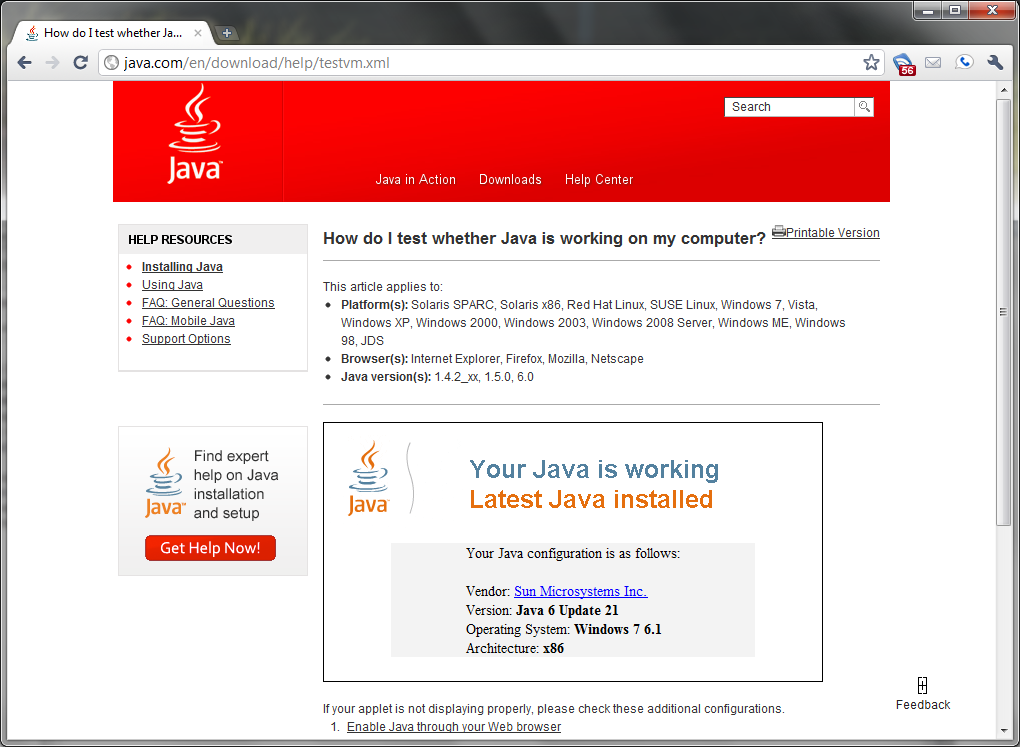
With the symlink fix in place, the Java version test page loads correctly in Chrome with no bonks with loading libraries from CWD disabled.

chrome-java-crt-symlink

Microsoft Should Formally Deprecate CWD from LoadLibrary Search

Microsoft recently released security security advisory 2269637, “Insecure Library Loading Could Allow Remote Code Execution”. The gist is that the search behavior of LoadLibrary() includes the current working directory, which is not the same as the directory containing the binary executable. Typically the current working directory (CWD) is set at launch time by Windows shell shortcut (LNK) or implicitly by invoking a document with a file association. The CWD can be anywhere on a supported local or remote file system, including Windows network (SMB/CIFS) shares and WebDAV.

Most applications must load code from libraries (DLLs) in order to run. The CWD is not a trusted secure location like Program Files or System32 but for reasons of backwards compatibility with pre-Windows NT forms of Windows, CWD is searched when loading DLLs. This makes the default behavior of LoadLibrary() dangerous and many, many Windows applications are vulnerable to luring attacks as a result.

Sample Luring Attack Scenario

  • Click on a link to an MP3 in an email or web page
  • File association causes popular MP3 player to load
  • CWD is set to the remote location of the MP3 player
  • Attacker has placed a malicious DLL that the popular MP3 player loads in the same location as the MP3
  • MP3 player loads malicious DLL
  • Malicious DLL loads the real DLL so MP3 player won’t crash
  • Popular MP3 player is owned an executing evil code

    Unfortunate Default Behavior

    Your application doesn’t have to search CWD but it is the default for reasons of backwards compatibility. Developers can turn this behavior off but it is the default and you a) have to know that you need to turn it off and b) know how to turn it off.

Patch Optionally Introduces New Behavior

KB2264107 is a patch that allows you to set registry keys to change the circumstances under which CWD is considered. The simplest option is to create a new DWORD value of the HKEY_LOCAL_MACHINE\SYSTEM\CurrentControlSet\Control\Session Manager key called CWDIllegalInDllSearch and set it to 0xffffffff. chrome-load-dll-cwd-errorThis globally disables the use of CWD for loading libraries.

My first thought was this would be fine. I’m running Windows 7 x64 with no legacy 16-bit apps. It should work fine and for me it did. The second computer I tried this on had a problem where Google Chrome 5 was unable to find avutil-50.dll. Chrome keeps its DLLs in a version-numbered subdirectory of the one containing Chrome.exe. This isn’t a part of the normal DLL search path and it seems like Chrome 5 is working around this by setting CWD to the directory which contains the DLLs before calling LoadLibrary(). Chrome 6 beta doesn’t do this which is why I didn’t notice the problem.

To fix this you can either dial the global CWDIllegalInDllSearch down to 2 which indicates CWD is allowed to be searched only if it is a local folder. Better, is to create a KEY_LOCAL_MACHINE\Software\Microsoft\Windows NT\CurrentVersion\Image File Execution Options\chrome.exe key with a CWDIllegalInDllSearch DWORD value of 2 (and remember to delete this when Chrome 6 goes stable).

I had a similar problem with the Apple Update program failing when it tried to install the latest version of QuickTime.

Developers Should Disable Loading DLLs from CWD

depI was really stunned to realize that Chrome was using this CWD load behavior. They probably didn’t realize the implications and it is insidious because it is the default. I think all developers and testers should install KB2264107 and globally disable loading from CWD. (Yes this is a PITA and it might break stuff on your box but you can suck it up and white list apps that are broken.) If your apps are broken by this then you need to fix them.

Microsoft should encourage this by formally deprecating loading DLLs from CWD with Windows 7 SP1. They need to roll it out like they did DEP. There needs to be Group Policy settings and a GUI for manipulating these registry keys along the lines of the DEP compatibility with radio buttons like “Turn on loading libraries from CWD” and “Turn off loading libraries from CWD except for those I select". With Windows 7 SP1, the default is to leave CWD turned on. By the time Windows 8 rolls around, the default is to disable CWD.

KB2264107 is Insufficient

The hotfix should probably actually provide some protection by globally disabling some form of CWD loading. Right now all it does is create the potential for you to make some registry changes which is definitely not OK for the average user. At a minimum they need to disable CWD over WebDAV (CWDIllegalInDllSearch=1) and probably all network shares (CWDIllegalInDllSearch=2). I’m curious why there is no setting to disable CWD on removable media like USB keys without cranking CWDIllegalInDllSearch all the way to 0xffffffff and disabling CWD globally.

Microsoft needs to provide a GUI and a Group Policy for managing the keys for disabling loading libraries from CWD. The Group Policy option is critical for Enterprise so that they can keep legacy apps running which can’t be modified. They also need to make it clear that loading from CWD is going to be deprecated very soon and will no longer be the default behavior in the next version of Windows.

Microsoft should also provide guidance that any app which depends on loading libraries from CWD is vulnerable. In particular, legacy line of business apps which cannot be made to run without loading libraries from CWD should not be allowed to run on a computer with network access because such apps will be juicy targets for spear phishing. In a lot of cases it should be possible to fix apps that load libraries from CWD by just moving the DLLs into the same directory as the EXE. If the app can’t be fixed, it needs to be sandboxed from the network.

The Sad History of the Microsoft POSIX Subsystem

When Windows NT was first being developed, one of the goals was to make the kernel separate from the programming interface. NT was originally intended to be the successor to OS/2 but Microsoft also wanted to include compatibility to run Windows 3.x applications and to meet 1980s era DoD Orange Book and FIPS specifications to sell to the defense market.  As a result, Windows NT was developed as a multiuser platform with sophisticated discretionary access controls capabilities and it was implemented as a hybrid microkernel 3 userland environments:

  • Windows (Win32)
  • OS/2
  • POSIX

Microsoft had a falling out with IBM over Win32 and the NT project split from OS/2. The team focus shifted to Win32 so much that the Client-Server Runtime Subsystem (CSRSS) that hosts the Win32 API became mandatory and OS/2 and POSIX subsystems were never really completed but they were shipped with the first five versions of Windows NT through Windows 2000. The OS/2 subsystem could only run OS/2 1.0 command-line programs and had no presentation manager support. The POSIX subsystem supported POSIX.1 spec but provided no shells or UNIX-like environment of any kind. With the success of Win32 in the form of Windows 95, the development of the OS/2 and POSIX subsystems ceased. They  were entirely dead and gone from Windows XP and Windows Server 2003.

Meanwhile, around 1996,  Softway Systems developed a UNIX-to-Windows NT porting system called OpenNT. OpenNT was built on the NT POSIX subsystem but fleshed it out into a usable UNIX environment. This was at a time when UNIX systems where hugely expensive. Softway used OpenNT to re-target a number of UNIX applications for US Federal agencies onto Windows NT. In 1998, OpenNT was re-named Interix. Softway Systems also eventually built a full replacement for the NT POSIX subsystem in order to implement system calls that the Microsoft POSIX subsystem didn’t support and to develop a richer libc, single-rooted view of the file system and a functional gcc.

Microsoft acquired Softway and the Interix platform in 1999. Initially Interix 2.2 was made available as a fairly expensive paid add-on to Windows NT 4 and Windows 2000. Later it was incorporated as a component of Services for UNIX 3.0 and 3.5 (SFU) and SFU was made free-of-charge. When Interix became free, Microsoft removed the X11 server component that was previously bundled with Interix because in the wake of U.S. vs Microsoft, they did not want to defend law suits from the entrenched and expensive PC X Server industry but the X11 client libraries remained.

SFU/Interix 3.0 was released in early 2002 followed up with SFU 3.5 less than two years later and cool stuff got implemented like fast pthreads, fork(), setuid, ptys, deaemons with RC scripts including inetd and sendmail among other things. InteropSystems ported OpenSSH and developed a high-performance port of Apache using pthreads and other proof-of-concept ports like GTK and GIMP among many other things. Hotmail even ran on Interix. And enterprising people did cool things like a Linux ELF binary loader on top of Interix.

I got into this stuff and built and donated ports to the SFU/SUA community, including cadaver, ClamAV, GnuMP, libtool, NcFTP, neon, rxvt and gnu whois. My company sponsored the port of OpenSSH to Interix 6.0 for Vista SUA (because it broke backwards compatibility with Interix 3.5 binaries). We ran Interix on all of our workstations and servers. We used it for management, remote access and to interop with clients who used Solaris, Linux and OS X on various projects.

Slowly Going Off the Rails

With Windows Server 2003 R2 (and only R2), Interix became a core operating system component, rebranded as “Subsystem for UNIX Applications” (SUA). Around this time, the core development team was reformed in India rather than Redmond and some of the key Softway developers moved on to other projects like Monad (PowerShell) or left Microsoft. Interix for Windows Server 2003 R2 (aka Interix 5.2) was broken. It shipped with corrupt libraries and a number of new but flawed APIs and broke some previously stable APIs like select(). Also, related to the inclusion of Interix as an OS component, SP2 for Windows Server 2003 clobbers Interix 3.5 installations.

Things have been downhill from there. It’s not just that obvious things didn’t get implemented like a fully-functional poll() or updating binutils and gcc to something reasonably modern. The software suffered from severe bitrot.

One of the consequences of including SUA as an OS component has been that a bifurcation of the “subsystem” from the “tools”. The subsystem consists of just a few files: psxss.exe, psxss.dll, posix.exe and psxrun.exe. This implements the runtime and a terminal environment but nothing else, not even libc. In order to get shells, PTYs and usable programs, you have to install the “Utilities and SDK for UNIX-based Applications”  (aka tools) which is sizable download. Apparently Microsoft has concern about bundling GPL code onto the actual Windows media.

OK. This is a little weird but not a big deal except that the development timeline of the tools is now completely out of whack with Windows releases. The tools for Vista were only available in beta when Vista went gold and the version for Windows Server 2008 and Vista SP1 was not available until about a month after Vista SP1/Win2k8 was released. When Windows 7 was released no tools were available at all in July 2009 when Windows 7 was released. They didn’t become available until 8 months later in March 2010 and contain no new features.

To top things off, while SFU 3.5 ran on all versions of NT 5.x, SUA only runs on Windows Server and the Enterpise and Ultimate client editions. SUA is not available on Vista Business or Home and Windows 7 Professional and Home editions.

Is Interix Dead?

For some reason Microsoft seems to be ambivalent about this technology. On the one hand they bring it into the core of the OS and make it a “premium” feature that only Enterprise and Ultimate customers get to use and on the other they pare back development to almost nothing.

Interix has been supported with support forms and a ports tree maintained by InteropSystems collectively known as SUA Community which operates with supplemental funding from Microsoft. The /Tools ports tree is the source for key packages not provided by Microsoft such as Bash, OpenSSH, BIND, cpio and a ton of libraries that Microsoft does not bundle.  Microsoft has been increasingly reluctant to fund the SUA Community and has survey users on a number of occasions. The latest survey was very pointed and culminated with Microsoft cutting off funding and shuttering the SUA Community site on July 6th, 2010 but a few days later it was back online. I’m not sure how or why.

I have no inside knowledge but my gut says that Interix has lost internal support at Microsoft. It is being kept on life support because of loud complaints from important customers but it is going nowhere. I will be surprised if there is a Subsystem for UNIX-based Applications in Windows 8. I think the ambivalence is ultimately about an API war. At some level, the strategerizers have decided it is better to not dignify UNIX API with support. I think the calculus is that people will still use Windows but it chokes off oxygen for UNIX-like systems if it takes a lot of extra work to write cross-platform code for Windows and UNIX—the premise being that you write for Windows first because that’s where the market is. Furthermore, in a lot of business cases what is needed is Linux support or Red Hat Linux version X support in order to run something. I think Microsoft realizes that it is hard for Interix to beat Linux which is why SUSE and Red Hat Linux can be virtualized under Hyper-V.

I also believe that Microsoft sees C/C++ APIs as “legacy”. I think they want to build an OS that is verifiably secure and more reliable by being based on fully managed code. The enormous library of software built for the Windows API is a huge legacy problem to manage in migrating to such a system. Layering POSIX/UNIX on top of that makes it worse.

Whatever the reason, it seems pretty clear that Interix is dying.